Blog
Back to blog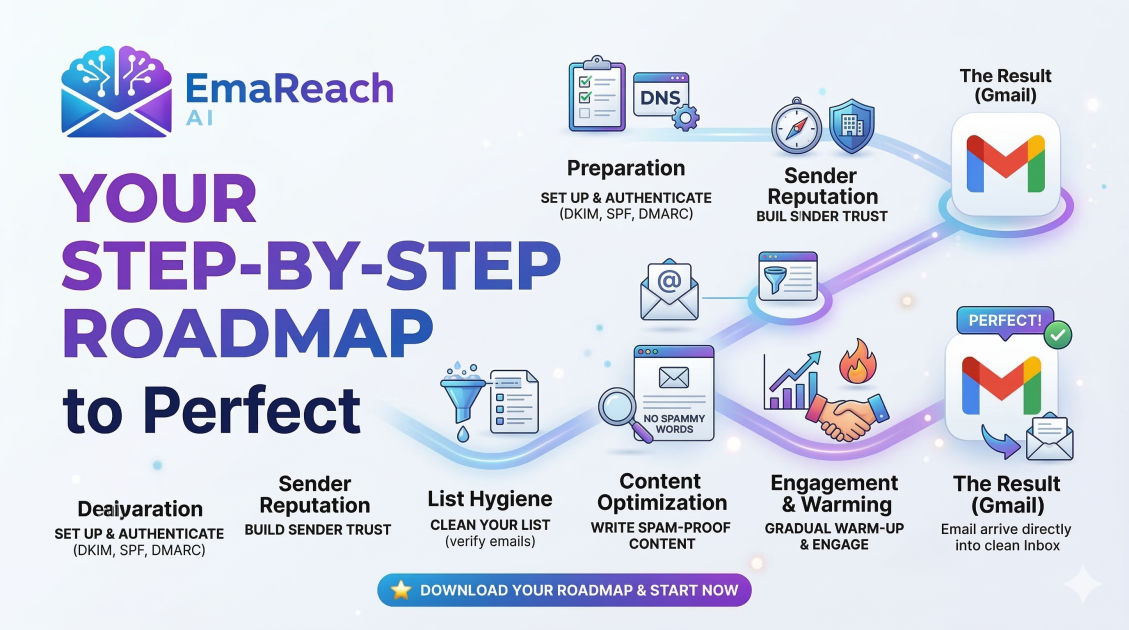
Your Step-by-Step Roadmap to Perfect Gmail Deliverability
email deliverabilitygmail optimizationcold emailemail marketingsender reputationSPF DKIM DMARC
Introduction to Gmail Deliverability
Email deliverability is the silent engine of every successful digital communication strategy. Whether you are running a high-growth startup, managing a corporate marketing department, or executing cold outreach, your ability to land in the primary inbox—rather than the dreaded spam folder—determines your ROI. Gmail, being one of the most sophisticated and widely used email service providers in the world, employs complex algorithms and machine learning to protect its users. To achieve perfect Gmail deliverability, you must understand these systems and align your sending practices with their expectations.
Landing in the inbox isn't about luck; it is a measurable science involving technical authentication, sender reputation, content quality, and engagement metrics. This guide provides a comprehensive roadmap to mastering these elements so your messages consistently reach your audience.
Phase 1: The Technical Foundation (Authentication)
Before you send a single email, your technical infrastructure must be flawless. Think of authentication as your digital passport. If your papers aren't in order, Gmail’s border control will turn you away immediately.
SPF (Sender Policy Framework)
SPF is a DNS record that lists the IP addresses and domains authorized to send emails on behalf of your domain. When an email arrives at Gmail, the server checks the SPF record. If the sender isn't on the list, the email is flagged as suspicious.
DKIM (DomainKeys Identified Mail)
DKIM adds a cryptographic signature to your emails. This ensures that the content of the email hasn't been tampered with during transit. It proves that the email genuinely originated from your domain and hasn't been intercepted by a third party.
DMARC (Domain-based Message Authentication, Reporting, and Conformance)
DMARC is the policy layer that tells Gmail what to do if an email fails SPF or DKIM checks. You can set it to "none" (monitor only), "quarantine" (send to spam), or "reject" (block entirely). Having a strict DMARC policy is a massive trust signal to Gmail's filters.
Phase 2: Domain and IP Reputation
Your reputation is a score Gmail assigns to your domain based on your historical behavior. If you have a history of sending high-value content that users interact with, your reputation rises. If you send unsolicited mail that gets marked as spam, it plummets.
Understanding the Difference Between Domain and IP Reputation
While IP reputation matters, Gmail increasingly prioritizes domain reputation. This means even if you change your sending service or IP address, your past behavior follows your domain name. It is critical to protect your root domain's health.
The Importance of Warm-up
You cannot start sending thousands of emails from a new domain or IP address overnight. This "burst" behavior is a classic hallmark of spammers. Instead, you must gradually increase your volume over several weeks. This process, known as "warming up," allows Gmail's filters to get to know you as a legitimate sender.
For those looking to automate this complex process, EmaReach (https://www.emareach.com/) provides a powerful solution. Stop Landing in Spam. Cold Emails That Reach the Inbox. EmaReach AI combines AI-written cold outreach with inbox warm-up and multi-account sending—so your emails land in the primary tab and get replies.
Phase 3: Content Optimization and User Experience
Gmail’s algorithms are incredibly adept at reading the "intent" of an email. They don't just look for keywords; they look at the overall structure and value proposition of your message.
Avoiding Spam Triggers
While modern filters are more advanced than simple keyword blacklists, certain elements still trigger red flags:
- Excessive Capitalization: SHOUTING IN THE SUBJECT LINE.
- Aggressive Sales Language: Overusing words like "Free," "Guarantee," or "Winner."
- Suspicious Formatting: Using too many different fonts, colors, or hidden text.
- Poor Link-to-Text Ratio: Having too many links relative to the amount of actual copy.
The Role of Tracking Pixels
Open tracking pixels are standard in marketing, but they can sometimes hurt deliverability, especially if the tracking domain has a poor reputation. If you are struggling to reach the inbox, consider testing your campaigns without tracking to see if performance improves.
Mobile Responsiveness
Gmail tracks how users interact with your emails. If your email is unreadable on mobile, users will delete it quickly or mark it as spam. Ensure your templates are responsive and load quickly.
Phase 4: Lists, Hygiene, and Engagement
Your list quality is perhaps the most significant factor in long-term deliverability. Gmail watches how users interact with your mail. High open rates and reply rates signal that your content is wanted.
Double Opt-In
Always use a double opt-in process. This ensures that the email addresses on your list are valid and that the owners truly want to receive your content. It virtually eliminates the risk of "spam traps" (dead email addresses used by providers to catch bad senders).
Pruning Inactive Subscribers
If a subscriber hasn't opened your emails in six months, they are dead weight. Worse, they are actively hurting your deliverability. By continuing to send to people who don't engage, you are telling Gmail that your content is irrelevant. Regularly remove or re-engage inactive users.
Handling Unsubscribes Gracefully
Never hide your unsubscribe link. If a user can't find the unsubscribe button, they will hit the "Report Spam" button instead. The latter is far more damaging to your reputation. Use a clear, one-click unsubscribe mechanism.
Phase 5: Monitoring and Maintenance
Deliverability is not a "set it and forget it" task. It requires constant vigilance and monitoring of specific tools and metrics.
Google Postmaster Tools
This is the most critical tool for anyone sending to Gmail users. It provides direct data from Google regarding your domain reputation, IP reputation, SPF/DKIM/DMARC success rates, and spam complaint rates. If your reputation drops from "High" to "Medium," you need to investigate immediately.
Monitoring Bounce Rates
A high bounce rate (above 2%) indicates poor list hygiene. There are two types of bounces:
- Hard Bounces: Permanent issues (e.g., the email address doesn't exist). These must be removed immediately.
- Soft Bounces: Temporary issues (e.g., the recipient's inbox is full). If an address soft bounces multiple times, it should be treated as a hard bounce.
Feedback Loops
While Gmail doesn't offer a traditional feedback loop like some other providers, they do provide aggregate data through Postmaster Tools. Use this data to identify which specific campaigns are causing spikes in spam reports.
Phase 6: Advanced Strategies for High-Volume Senders
As your volume scales, the margin for error shrinks. High-volume senders must adopt more rigorous standards to maintain their standing.
Dedicated vs. Shared IPs
If you send more than 100,000 emails per month, you should consider a dedicated IP address. This isolates your reputation from other senders. However, if you send lower volumes, a shared IP from a reputable provider might be better, as it provides a consistent "heartbeat" of volume that is difficult for low-volume senders to maintain on their own.
Subdomain Segmentation
To protect your primary brand communications, use subdomains for different types of mail. For example:
marketing.yourdomain.comfor newsletters.orders.yourdomain.comfor transactional receipts.support.yourdomain.comfor customer service.
If one subdomain runs into deliverability issues, the others remain unaffected.
Conclusion
Achieving perfect Gmail deliverability is an ongoing journey of technical precision and audience respect. By securing your technical foundation with SPF, DKIM, and DMARC, maintaining a pristine domain reputation through gradual warm-ups, and providing genuine value to your subscribers, you can ensure your voice is heard in the crowded digital landscape.
Remember that Gmail's primary goal is to protect its users. When you align your goals with theirs—by sending relevant, wanted, and authenticated content—the doors to the primary inbox will remain open. Regular monitoring via Google Postmaster Tools and constant list hygiene are your best defenses against the spam folder. Stay diligent, stay authentic, and your email strategy will thrive.
EmaReach AI
Ready to scale your cold email outreach?
Join thousands of teams using EmaReach AI for AI-powered campaigns, domain warmup, and 95%+ deliverability. Start free — no credit card required.
Related posts
- Read article
The Instantly Alternative That Finally Gets Outbound Analytics Right
Discover why high-volume cold email requires a shift from surface-level vanity metrics to deep, data-driven revenue attribution, and explore the ultimate alternatives for mastering outbound engineering.
- Read article
How Choosing the Right Instantly Alternative Changed Our Pipeline Numbers
Discover how transitioning from a volume-first cold email setup to an advanced, deliverability-focused infrastructure transformed our B2B pipeline metrics, skyrocketed open rates to over 68%, and tripled our monthly booked demos.