Blog
Back to blog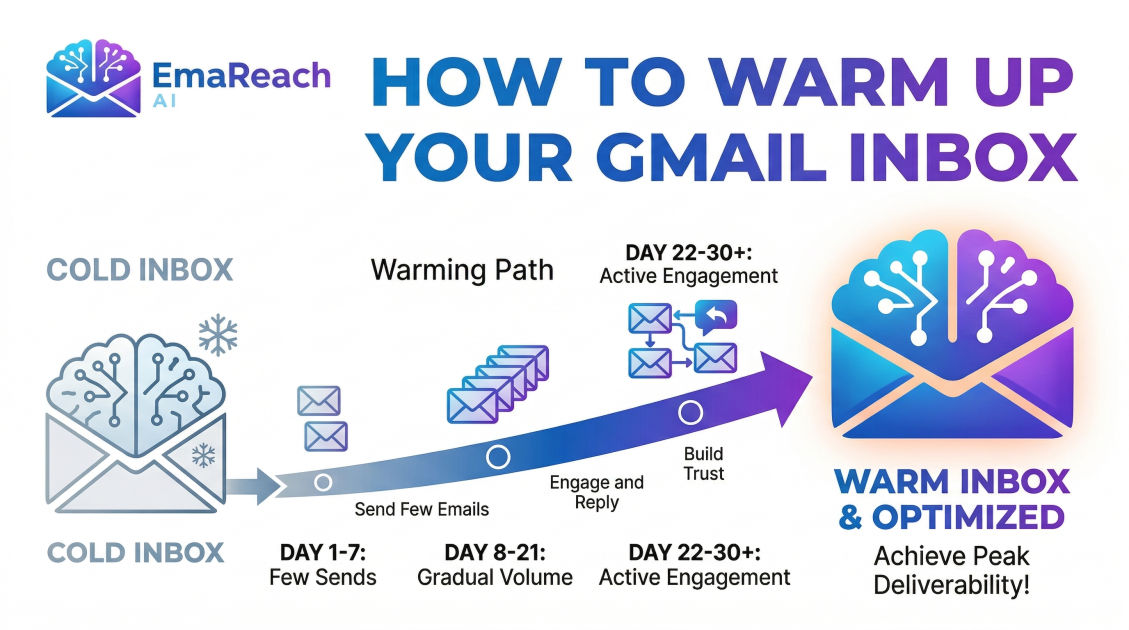
How to Warm Up Your Gmail Inbox for Better Deliverability
cold emailoutreachdeliverabilityemail marketingb2b salessender reputation
Introduction
If you are relying on cold outreach to generate leads, close deals, or build a professional network, your email deliverability is the absolute foundation of your success. You can craft the most compelling, personalized, and persuasive pitch imaginable, but it will yield zero results if it lands in the recipient's spam folder. For modern businesses and sales professionals, the Gmail inbox is prime real estate. However, getting your messages to land directly in the primary tab of a prospect's Gmail account requires strategic preparation. This preparation is known as "inbox warm-up."
Warming up a Gmail inbox is the systematic process of gradually increasing your email sending volume while simulating genuine, human-like email behavior. It signals to Google and other major email service providers that you are a trustworthy sender, rather than a spammer or a bot. In this comprehensive guide, we will explore the precise mechanics of email deliverability, the essential technical prerequisites you must configure, and a detailed, step-by-step roadmap to effectively warm up your Gmail inbox for maximum outreach success.
Why Gmail Deliverability Matters More Than Ever
Major email service providers, with Google leading the charge, are continuously updating their algorithms to protect their users from malicious phishing attempts, unsolicited bulk emails, and irrelevant spam. Their primary goal is user satisfaction, which means keeping unwanted emails out of the primary inbox.
When you create a brand-new email account on a new domain, your sender reputation is completely neutral. You have no track record. From the perspective of a spam filter, a new account that suddenly begins sending hundreds of identical emails per day is displaying classic spammer behavior. If you trigger these algorithms, your domain reputation will plummet, your emails will be routed to the spam folder, and your domain could even become permanently blacklisted.
Deliverability is not a one-time setup; it is a continuously fluctuating metric based on your ongoing sender behavior. By taking the time to warm up your inbox, you are proactively building a pristine reputation. You are proving to the algorithms that your emails are expected, opened, read, and replied to by real human beings.
What is Email Warm-Up?
At its core, email warm-up is about building trust. It is the process of easing a new email account into active duty by sending a very small number of emails initially and slowly increasing that volume over a period of several weeks.
However, volume is only one part of the equation. True inbox warm-up also involves generating positive engagement. When you send an email during the warm-up phase, you want the recipient to open it, scroll through it, mark it as "important," and, most crucially, reply to it. If an email happens to land in the spam folder, you want the recipient to retrieve it and mark it as "not spam." This two-way interaction is the strongest positive signal you can send to an email provider.
Pre-Warm-Up: Setting Up Your Technical Foundations
Before you send a single warm-up email, you must ensure that your technical infrastructure is flawless. Skipping these foundational steps will render your warm-up efforts completely useless. Email providers check these specific domain records to verify your identity.
1. Sender Policy Framework (SPF)
SPF is a DNS record that acts as a public guest list for your domain. It explicitly tells receiving email servers which IP addresses and services are authorized to send emails on behalf of your domain. When you use Google Workspace, you must add Google's specific SPF record to your domain's DNS settings. If a receiving server gets an email claiming to be from your domain, but the sending server is not on your SPF list, the email will almost certainly be rejected or marked as spam.
2. DomainKeys Identified Mail (DKIM)
DKIM adds a cryptographic signature to your outgoing emails. This digital signature travels with the email and allows the receiving server to verify that the email was indeed sent by the domain owner and that the content of the email was not altered or tampered with while in transit. Setting up DKIM involves generating a public key in your Google Workspace admin console and adding it as a TXT record in your DNS settings.
3. Domain-based Message Authentication, Reporting, and Conformance (DMARC)
DMARC is the final piece of the authentication triad. It ties SPF and DKIM together. A DMARC record tells the receiving server exactly what to do if an email fails either the SPF or DKIM checks. You can set the policy to monitor (do nothing), quarantine (send to spam), or reject (block entirely). For a new domain, starting with a monitoring policy is recommended, but simply having the DMARC record present is a massive positive signal to spam filters.
4. Custom Tracking Domains
If you plan to track opens and clicks in your eventual cold email campaigns, setting up a custom tracking domain is vital. By default, many email sending tools use shared tracking domains. If another user on that shared domain sends spam, the shared tracking domain gets penalized, dragging your deliverability down with it. A custom tracking domain ensures your tracking links match your sender domain, maintaining trust.
5. Profile Optimization
Spam filters look for human characteristics. Ensure your Google Workspace account has a real profile picture (ideally a clear, professional headshot). Fill out your signature block with a real physical address, your company name, and a phone number. These small details separate you from low-effort bot accounts.
The Manual Method: How to Warm Up Your Gmail Inbox Step-by-Step
If you choose to warm up your inbox manually, you must be disciplined and methodical. You will need a network of colleagues, friends, or secondary email accounts across different providers (Gmail, Outlook, Yahoo) to interact with.
Week 1: Establishing Basic Activity
During the first week, your goal is to look like a normal professional setting up a new email account.
- Day 1-2: Send 2 to 5 emails per day to colleagues or friends. Ask them to reply. Subscribe to 3 or 4 high-quality, reputable industry newsletters.
- Day 3-5: Gradually increase sending to 5 to 10 emails per day. Write manual, conversational emails. Avoid any sales language, links, or attachments. Ensure that at least 50% of your sent emails receive a reply.
Week 2: Increasing Volume Slowly
The second week is about showing consistent, moderate growth.
- Day 6-10: Send 10 to 20 emails per day. Continue to ensure a high reply rate. If any of your emails land in a friend's spam folder, instruct them to explicitly click "Report not spam" and move it to the primary inbox. This is a powerful trust signal.
- Day 11-14: Send 20 to 30 emails per day. You can begin organizing your inbox, creating folders, and starring important messages. Spam filters monitor how you interact with incoming mail, not just what you send.
Week 3: Simulating Real Conversations
By week three, you want to demonstrate deep engagement.
- Day 15-21: Send 30 to 40 emails per day. Focus on creating long conversation threads. Send an email, get a reply, reply back to that message, and so on. Threaded conversations are a strong indicator of human interaction.
Week 4 and Beyond: Reaching Target Volume
- Day 22-30: Slowly push your volume up to 40 to 50 emails per day. Maintain a reply rate of at least 30%. At this point, your inbox is sufficiently warmed up to begin small-scale, highly targeted outreach campaigns.
Best Practices During the Warm-Up Phase
To maximize the effectiveness of your warm-up period, adhere strictly to the following best practices:
- Avoid Links and Attachments Initially: Links and attachments are heavily scrutinized by spam filters because they are the primary delivery mechanisms for malware and phishing sites. Do not include them in your warm-up emails.
- Write Like a Human: Avoid typical marketing jargon like "Free," "Guarantee," "Act Now," or "Discount." Write plain-text, conversational emails about everyday topics.
- Vary Your Sending Times: Do not schedule all 20 of your daily emails to send at exactly 9:00 AM. Humans send emails sporadically throughout the day. Spread your volume out to mimic natural behavior.
- Read and Interact with Incoming Mail: Open the newsletters you subscribed to. Scroll through them. Reply to a few. Move emails around in your inbox. Show Google that the account is actively managed by a real person.
- Keep Bounce Rates at Absolute Zero: A bounced email (when an email is sent to an address that does not exist) is devastating to a new domain. Only send warm-up emails to addresses you know with 100% certainty are active and monitored.
Automating the Process: The Role of Warm-Up Tools
While the manual method is effective, it is incredibly time-consuming and difficult to scale, especially if you manage multiple sending domains or run an agency. This is where automated warm-up tools become essential.
Automated platforms connect to your Gmail inbox and utilize a vast network of real, peer-to-peer email accounts to simulate the exact human behaviors described above. They automatically send emails on your behalf, retrieve them from spam folders, mark them as important, and generate realistic replies using artificial intelligence.
For those looking to streamline this process and scale their outreach effectively, leveraging specialized platforms can make a significant difference. Stop Landing in Spam. Cold Emails That Reach the Inbox. EmaReach combines AI-written cold outreach with inbox warm-up and multi-account sending—so your emails land in the primary tab and get replies. By utilizing such tools, you ensure that the intricate dance of volume throttling, engagement simulation, and spam folder retrieval is handled entirely in the background, allowing you to focus on strategy and copywriting.
Understanding Gmail's Spam Filters and Algorithms
To truly master deliverability, you must understand what Google's algorithms are looking for. Google utilizes sophisticated machine learning models to analyze billions of emails daily. They categorize emails based on several key pillars:
1. Sender Reputation
This is a score assigned to your IP address and your domain name. It is heavily influenced by your past sending behavior. A high reputation means your emails bypass strict scrutiny; a low reputation means your emails are immediately flagged. Warming up is the process of building this reputation from scratch.
2. User Engagement
Google closely monitors how recipients interact with your emails. Positive signals include high open rates, high reply rates, emails being forwarded, and emails being moved from the promotional tab to the primary tab. Negative signals include emails being deleted without being opened, emails being left unread for long periods, and, worst of all, users actively clicking the "Report Spam" button.
3. Content Analysis
Spam filters scan the actual content of your emails. They look for suspicious HTML structures, an unbalanced image-to-text ratio, hidden text, and known spam trigger words. They also analyze the domains of any links included in your email. If you link to a website with a poor reputation, your email will be penalized, regardless of your domain's health.
Transitioning from Warm-Up to Active Cold Outreach
Once your inbox has been warming up for three to four weeks, you are ready to transition to active outreach. However, this must be done with extreme caution. You cannot switch from 40 warm-up emails a day to 500 cold emails the next day. The sudden spike in volume and the inevitable drop in engagement (because cold prospects reply less often than warm-up networks) will destroy the reputation you just built.
The Golden Rule of Transition: Keep the warm-up running.
Even when you launch your live campaigns, you should maintain a background level of warm-up activity. If you are sending 50 cold emails a day, you should still be sending 30 to 40 automated warm-up emails. This ensures that your overall domain engagement metrics remain artificially high, padding your sender reputation against the lower open and reply rates of cold outreach.
When launching your campaign, start with a tiny fraction of your total list. Send 10 to 15 cold emails on the first day. Monitor the open rates and bounce rates obsessively. If the metrics look healthy, increase the cold volume by 5 to 10 emails each subsequent day. Never scale too fast.
Common Mistakes to Avoid During Gmail Warm-Up
Even well-intentioned marketers frequently sabotage their own deliverability by making critical errors during the warm-up phase. Avoid these pitfalls at all costs:
- Skipping DMARC Configuration: Many people stop after setting up SPF and DKIM. Failing to implement DMARC leaves your domain vulnerable and deprives you of a major trust signal in the eyes of Google.
- Using Tracking Pixels Immediately: Open tracking relies on an invisible pixel embedded in the email. Spam filters know this and are highly suspicious of tracking pixels from unknown domains. Disable open and click tracking entirely during the first few weeks of your live campaigns to establish ultimate trust.
- Buying Cheap Domains: If you are buying secondary domains for outreach, avoid obscure extensions like
.xyzor.info. These extensions are heavily abused by spammers and carry an inherent negative reputation. Stick to.com,.net, or.codomains whenever possible. - Ignoring Reply Management: If a prospect replies to your cold email asking to be removed from your list, you must honor that request immediately. Continuing to email someone who has opted out will result in a hard spam complaint, which severely damages your domain health.
Conclusion
Warming up your Gmail inbox is not an optional growth hack; it is a mandatory foundational step for anyone serious about email outreach and digital communication. By meticulously configuring your technical settings, patiently pacing your sending volume, and actively generating positive engagement signals, you effectively train Gmail's algorithms to trust you. Deliverability requires a long-term mindset. By respecting the process, adhering to best practices, and maintaining a healthy balance between warm-up activity and cold sending, you will protect your domain reputation, bypass the spam folder, and ensure your message consistently reaches the primary inbox where it belongs.
EmaReach AI
Ready to scale your cold email outreach?
Join thousands of teams using EmaReach AI for AI-powered campaigns, domain warmup, and 95%+ deliverability. Start free — no credit card required.
Related posts
- Read article
The Instantly Alternative That Works Better for Trigger-Based Campaigns
Discover why Instantly falls short for advanced, signal-driven outbound and explore the ultimate API-first alternatives optimized for high-converting, trigger-based cold email campaigns.
- Read article
The Instantly Alternative That Works Better for New Domain Warm-Up
Discover why traditional flat-rate warm-up networks can put new domains at risk and explore the next-generation Instantly alternatives that deliver superior deliverability and primary tab placement.