Blog
Back to blog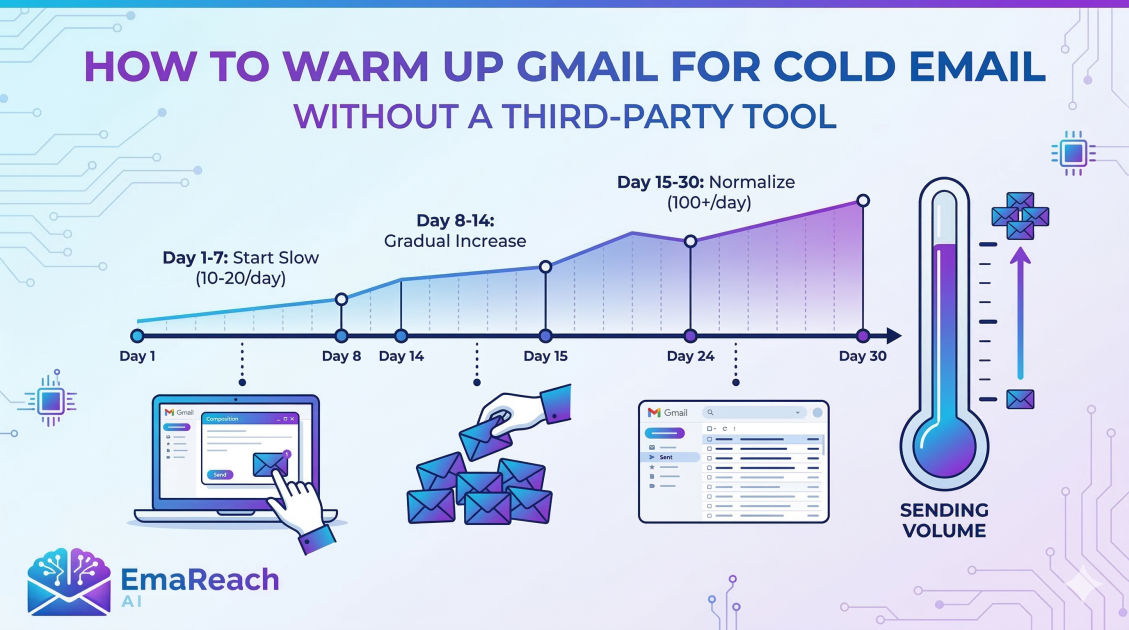
How to Warm Up Gmail for Cold Email Without a Third-Party Tool
gmail warmupcold emaildeliverabilityemail marketingsender reputationoutreach strategy
Introduction to Email Warming
Email deliverability is the silent engine of every successful cold outreach campaign. You could have the most compelling offer in the world, but if your message lands in the 'Spam' or 'Promotions' folder, your conversion rate will stay at zero. When you create a new Gmail account or start sending high volumes from an aged one, Google’s algorithms monitor your behavior closely. Sudden spikes in outgoing mail from a dormant account are a classic hallmark of a spammer.
To avoid being blacklisted, you must 'warm up' your email address. While many marketers rely on automated software, there are significant advantages to warming up Gmail manually. Manual warming mimics organic human behavior more accurately than many bots, helping you build a pristine sender reputation. This guide provides a comprehensive blueprint for warming up your Gmail account without any third-party tools.
The Concept of Sender Reputation
Before diving into the steps, it is vital to understand what you are trying to influence: your Sender Reputation. Google assigns a score to your domain and your specific IP address based on several factors:
- Spam Complaints: The number of times recipients mark your emails as spam.
- Bounce Rate: How many of your emails are sent to non-existent addresses.
- Engagement Rate: How often people open, click, and—most importantly—reply to your emails.
- Consistency: Whether your sending volume is steady or erratic.
By warming up your email manually, you are proving to Google that you are a real person engaging in meaningful conversations. This establishes trust, ensuring that when you eventually launch your full cold email campaign, your messages land in the primary inbox.
Phase 1: Proper Technical Foundations
Even without a third-party warmup tool, you cannot skip the technical authentication. This is the 'ID card' for your email. If your authentication is missing, Google will likely flag your emails regardless of how slowly you send them.
1. Set Up SPF (Sender Policy Framework)
SPF is a DNS record that specifies which mail servers are authorized to send emails on behalf of your domain. Without this, anyone could spoof your email, and Google's filters will be highly suspicious of your outgoing mail.
2. Configure DKIM (DomainKeys Identified Mail)
DKIM adds a digital signature to your emails. This allows the receiving server to verify that the email was actually sent by the domain owner and wasn't tampered with during transit.
3. Implement DMARC (Domain-based Message Authentication, Reporting, and Conformance)
DMARC uses SPF and DKIM to give instructions to the receiving mail server on what to do if an email fails authentication (e.g., 'reject it' or 'quarantine it').
4. Optimize Your Profile
A real human has a complete profile. Upload a professional profile picture, set up a simple text-based signature, and ensure your 'Display Name' matches the name used in your outreach. Avoid including too many links or heavy images in your signature during the warmup phase, as these can trigger spam filters.
Phase 2: The Manual Warmup Schedule
The key to manual warming is gradual progression. You want to start with a very low volume and increase it slowly over several weeks.
Week 1: Establish Contact
In the first week, your goal is not outreach, but activity.
- Volume: 5–10 emails per day.
- Recipients: Use accounts you own (other Gmail, Outlook, or Yahoo accounts) or friends and colleagues.
- Activity: Send a simple message and ensure that the recipient replies. Open the reply from your side. This 'back-and-forth' is the strongest signal of a high-quality sender.
Week 2: Expanding the Circle
- Volume: 15–20 emails per day.
- Recipients: Continue emailing your personal network, but start signing up for a few high-quality newsletters (e.g., Harvard Business Review, Morning Brew, or niche industry blogs).
- Activity: When newsletters arrive in your inbox, open them and move them to folders. If they land in 'Promotions,' move them to 'Primary.' This tells Google you value the mail you receive.
Week 3: Introducing Variation
- Volume: 30–40 emails per day.
- Activity: Start sending slightly longer emails. Avoid 'salesy' language. Ask questions that require a response. If any of your test emails land in the spam folder of your other accounts, manually mark them as 'Not Spam.'
Week 4: The Transition
- Volume: 50 emails per day.
- Activity: At this point, your account is starting to look established. You can begin sending your first few actual cold emails to highly targeted prospects, but keep the volume low. Ensure these prospects are very likely to be interested so you don't get hit with spam reports early on.
Phase 3: Maximizing Engagement Naturally
Google doesn't just look at how many emails you send; it looks at how people interact with them. To warm up Gmail effectively without a tool, you must manufacture 'perfect' engagement.
The Importance of Replies
A reply is the ultimate vote of confidence. When you are warming up your account manually, make sure at least 25-30% of your emails receive a response. In a natural setting, this happens when you email colleagues or friends. If you are using a network of your own accounts, don't just send one-word replies. Type out a sentence or two to make the traffic look organic.
Avoid the 'Spam' Trigger Words
During the warmup phase, your reputation is fragile. Avoid using words like 'Free,' 'Buy Now,' 'Discount,' 'Winner,' or 'Investment' in your subject lines or body text. These are red flags for automated filters. Stick to conversational, plain-text language.
Use Plain Text Over HTML
While fancy templates with logos and buttons look nice, they carry more 'code' weight. Plain text emails have the highest deliverability rates because they look like personal correspondence. During the first 30 days of your Gmail account's life, stick exclusively to plain text.
Phase 4: Monitoring Your Progress
How do you know if your manual warmup is working? Since you aren't using a third-party tool with a dashboard, you have to be your own data analyst.
Check Postmaster Tools
Google Postmaster Tools is a free resource provided by Google. It allows you to track your domain reputation, IP reputation, and any delivery errors. It won't give you data for very small volumes, but as you scale toward the end of your warmup, it becomes an essential health check.
The 'Sent' Folder Audit
Check your sent folder regularly. If you notice a high number of 'Delivery Status Notification (Failure)' emails, stop sending immediately. This means your bounce rate is too high, and you are damaging your reputation. Verify your lead list manually before sending any more emails.
Moving Toward Scaling
Once you have spent 4-6 weeks manually warming your account and your emails are consistently hitting the primary inbox of your test accounts, you are ready to scale. However, 'scaling' doesn't mean jumping from 50 to 500 emails overnight. Continue to increase your daily limit by no more than 10-20% per week.
For those who find the manual process too labor-intensive as they grow, services like EmaReach (https://www.emareach.com/) can be a natural next step. EmaReach AI combines AI-written cold outreach with inbox warm-up and multi-account sending—so your emails land in the primary tab and get replies. It bridges the gap between the meticulous care of manual warming and the efficiency of automation.
Common Mistakes to Avoid
- Sending Too Many Links: In the first month, try to include zero links. If you must, include only one to a reputable site like LinkedIn.
- Irregular Patterns: Sending 100 emails on Monday and 0 on Tuesday looks like bot behavior. Keep your volume consistent.
- Using 'Dirty' Lead Lists: If you buy a cheap list of 10,000 emails and start blast-sending, your account will be suspended within hours. Manual warmup only works if the recipients are valid.
- Ignoring the Receiving End: If you send emails to your own accounts but never open them, you aren't warming the account. You must simulate the full lifecycle of an email.
Conclusion
Warming up a Gmail account for cold email without a third-party tool is a test of patience, but it is one of the most effective ways to ensure long-term deliverability. By focusing on technical authentication, gradual volume increases, and high-quality manual engagement, you build a foundation of trust with Google's algorithms. This organic approach ensures that when you finally reach out to your dream clients, your message is waiting for them right at the top of their inbox.
EmaReach AI
Ready to scale your cold email outreach?
Join thousands of teams using EmaReach AI for AI-powered campaigns, domain warmup, and 95%+ deliverability. Start free — no credit card required.
Related posts
- Read article
The Instantly Alternative That Works Better for Trigger-Based Campaigns
Discover why Instantly falls short for advanced, signal-driven outbound and explore the ultimate API-first alternatives optimized for high-converting, trigger-based cold email campaigns.
- Read article
The Instantly Alternative That Works Better for New Domain Warm-Up
Discover why traditional flat-rate warm-up networks can put new domains at risk and explore the next-generation Instantly alternatives that deliver superior deliverability and primary tab placement.