Blog
Back to blog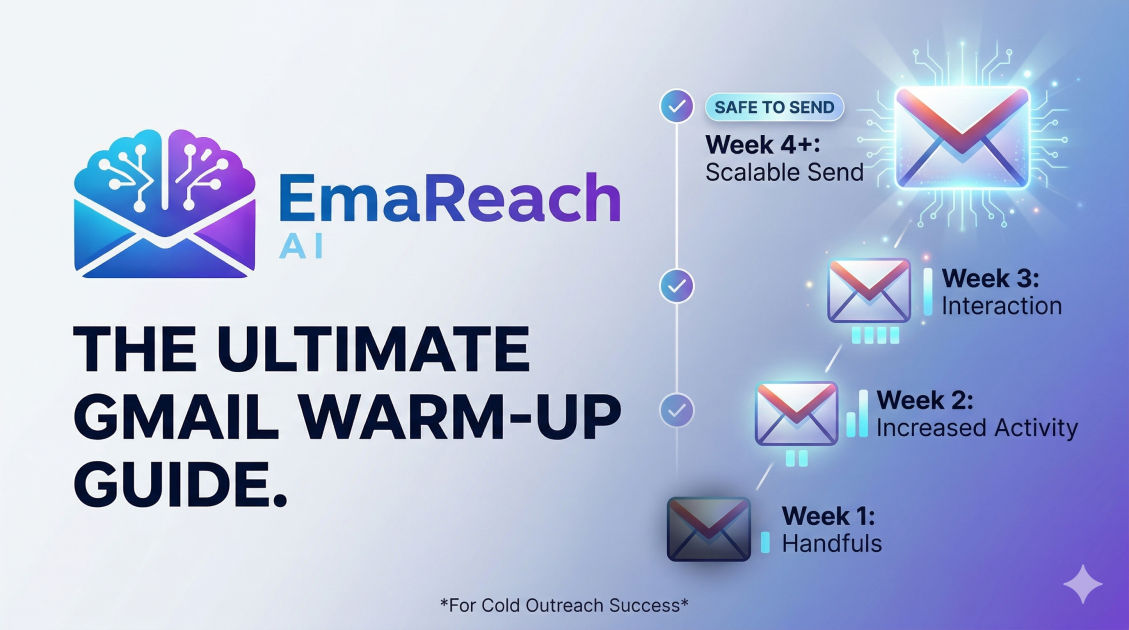
How to Warm Up a New Gmail Account for Cold Outreach
cold emailoutreachemail deliverabilityb2b salesgmail warmuplead generation
Introduction
Launching a cold email outreach campaign is one of the most effective ways to generate leads, build partnerships, and drive revenue. However, the landscape of email deliverability is increasingly complex. You cannot simply purchase a new domain, set up a Google Workspace account, and immediately blast thousands of emails to your prospects. If you attempt this, Internet Service Providers (ISPs) and email clients will instantly flag your domain as suspicious, routing your carefully crafted messages directly into the spam folder.
To succeed in cold outreach, you must establish trust. This process of building trust with email providers is known as "email warm-up." Warming up an email account is a systematic, gradual process of establishing a positive sender reputation. It involves simulating natural human behavior, properly configuring authentication protocols, and incrementally increasing your sending volume over time.
This comprehensive guide will walk you through the exact steps required to properly warm up a new Gmail account for cold outreach. From technical configurations to daily sending limits, you will learn how to build an ironclad sender reputation that ensures your emails consistently land in the primary inbox.
Understanding Sender Reputation
Before diving into the mechanics of warming up an account, it is crucial to understand what you are actually trying to achieve. Email providers like Google, Microsoft, and Yahoo use sophisticated algorithms to protect their users from spam, phishing, and malicious content. These algorithms assign a "sender reputation" score to your domain and your IP address.
Your sender reputation is influenced by several key factors:
- Domain Age: Brand new domains are inherently suspicious. Scammers frequently buy domains, send massive volumes of spam, and abandon them. A fresh domain needs time to mature.
- Authentication: Whether your domain has the proper technical records (SPF, DKIM, DMARC) proving that you are who you say you are.
- Engagement Rates: How recipients interact with your emails. High open rates, frequent replies, and emails being moved from spam to the inbox signal a positive reputation.
- Bounce Rates: Sending emails to invalid or non-existent addresses signals that you are guessing emails or using low-quality lists, which damages your reputation.
- Spam Complaints: If a recipient manually clicks the "Mark as Spam" button, it is a massive blow to your sender score.
The goal of the warm-up process is to carefully control these variables, proving to Google and other providers that your new account is operated by a legitimate professional sending valuable content.
Phase 1: Technical Foundation and Authentication
The warm-up process begins before you send a single email. If your technical foundation is flawed, no amount of careful sending will save your deliverability. You must configure three critical DNS records to authenticate your domain.
Sender Policy Framework (SPF)
SPF is a DNS record that acts as a public guest list for your domain. It tells receiving email servers exactly which IP addresses and services are authorized to send emails on your behalf. When a server receives an email from your domain, it checks the SPF record. If the email originates from an unauthorized source, it is likely to be marked as spam.
For a Google Workspace account, setting up SPF involves adding a simple TXT record to your domain's DNS settings. This record explicitly includes Google's mail servers as authorized senders. Without a valid SPF record, your emails will almost certainly fail basic security checks.
DomainKeys Identified Mail (DKIM)
While SPF verifies the source of the email, DKIM verifies the integrity of the email content. DKIM adds a hidden cryptographic signature to your outgoing emails. The receiving server uses a public key (published in your DNS records) to verify this signature.
If the signature matches, the receiving server knows that the email truly came from your domain and that its contents were not tampered with in transit. Generating a DKIM key is done directly within the Google Workspace Admin console, and you must then publish the resulting TXT record in your domain's DNS settings. It is a mandatory step for bypassing strict modern spam filters.
Domain-based Message Authentication, Reporting, and Conformance (DMARC)
DMARC ties SPF and DKIM together. It provides instructions to the receiving server on what to do if an email fails SPF or DKIM checks. Setting up a DMARC record protects your domain from being spoofed by bad actors.
When starting with a new domain, it is best practice to set your DMARC policy to "none." This tells receiving servers to let the emails through even if they fail checks, but to send you a report about the failure. As your domain matures and you ensure your authentication is working perfectly, you can increase the strictness of your DMARC policy to "quarantine" or "reject" to fully secure your domain.
Custom Tracking Domains
If you plan to track opens and clicks in your cold emails (though doing so in initial outreach is often discouraged for deliverability reasons), you must set up a custom tracking domain. Most cold email software uses shared tracking domains by default. If another user on that shared domain sends spam, the shared tracking link becomes blacklisted, dragging your deliverability down with it. A custom tracking domain isolates your reputation, ensuring you are solely responsible for your own deliverability.
Phase 2: Profile Optimization and Humanization
Spam filters do not just look at technical records; they look for anomalies in behavior and account setup. A blank, newly created email account looks like a bot. You must make your Google Workspace account look as human as possible.
Complete the User Profile
Navigate to your Google account settings and fill out every possible field. Upload a real, professional profile picture. Add a recovery email address and a recovery phone number. Set your time zone correctly. The more complete the profile, the more legitimate the account appears to Google's internal systems.
Configure a Professional Signature
Create a standard text-based email signature. Include your full name, your job title, your company name, and a link to your website. Avoid using large image files or heavily stylized HTML signatures in the beginning, as these can trigger filters. Keep it clean, professional, and entirely text-based.
Subscribe to Newsletters
A natural email inbox receives mail. If an account only sends emails but never receives any, it looks highly suspicious. In your first few days, use your new Gmail account to subscribe to various high-quality industry newsletters, SaaS product updates, and daily digests.
When these newsletters arrive, open them, scroll through them, and occasionally click a link. This generates inbound traffic and simulates normal user behavior, adding positive weight to your account's reputation.
Phase 3: The Manual Warm-Up Protocol
With your technical foundation set and your profile optimized, you can begin sending emails. The manual warm-up phase requires patience. You must resist the urge to load up a list of prospects and hit send.
The First Two Weeks
During the first 14 days, your focus should be entirely on internal communication and reaching out to trusted contacts. The goal is to generate a 100% open rate and a high reply rate.
- Send to Colleagues: Email your coworkers. Ask them to reply to your messages, and ensure you reply back to keep a thread going.
- Send to Personal Accounts: Send emails from your new business account to your personal Gmail, Yahoo, or Apple accounts. Open them, reply to them, and move them to the primary inbox if they happen to land in the promotions or spam tabs.
- Vary Your Content: Do not send the same "test" message repeatedly. Write real, conversational emails. Ask questions, share links to articles, and write in varied lengths.
Rescuing Emails from Spam
If any of your initial manual emails land in a spam folder (which can happen with brand new domains), it is an opportunity, not a disaster. Log into the receiving account, locate the email in the spam folder, and manually click "Report as not spam" or "Move to Inbox." This action sends a powerful, positive signal to the ISP that your domain's emails are desired by recipients.
Phase 4: Automated Warm-Up and Scaling
After a couple of weeks of manual sending, maintaining the required volume and reply rates manually becomes incredibly tedious and ultimately impossible to scale. This is where automated warm-up networks come into play.
Automated warm-up tools connect your email account to a network of thousands of other real email accounts. The software automatically sends emails from your account to others in the network, and vice versa. It automatically opens your emails, replies to them, marks them as important, and pulls them out of the spam folder if necessary.
Leveraging Advanced Tools
Choosing the right infrastructure is critical for long-term success. You need a system that mimics human behavior perfectly while managing multiple accounts effortlessly. To stop landing in spam and ensure cold emails that reach the inbox, tools like EmaReach become invaluable. EmaReach AI combines AI-written cold outreach with inbox warm-up and multi-account sending—so your emails land in the primary tab and get replies. By automating the complex back-and-forth communication required to build trust, these platforms allow you to focus on writing great copy rather than managing infrastructure.
The Volume Ramp-Up Schedule
Even with automated tools, you cannot jump from zero to hundreds of emails overnight. You must follow a strict ramp-up schedule. A standard timeline looks like this:
- Week 1: Start the automated warm-up tool. Limit total daily sending (warm-up + manual) to 5-10 emails per day.
- Week 2: Increase the limit to 15-25 emails per day. Continue monitoring for bounces.
- Week 3: Increase to 30-40 emails per day. You can now begin introducing a very small, highly targeted list of real prospects (e.g., 5-10 real cold emails per day alongside the warm-up volume).
- Week 4: Increase to 40-50 emails per day.
For a single Google Workspace account, the absolute maximum safe limit for cold outreach is generally considered to be around 30 to 50 emails per day. Pushing beyond this limit significantly increases the risk of being flagged, regardless of how well the account is warmed up.
Phase 5: Multi-Account Architecture
If the safe limit for a single Gmail account is roughly 40 emails per day, how do large agencies and sales teams send thousands of emails? The answer is horizontal scaling through a multi-account architecture.
Instead of trying to force one email account to send 500 emails a day, you spread the load across multiple accounts and multiple domains.
For example, if your primary company domain is company.com, you should never use it for cold outreach. If the domain gets blacklisted, your internal company emails, transactional emails, and client communications will all go to spam.
Instead, you purchase secondary domains that look similar, such as:
trycompany.comgetcompany.comcompanyhq.com
You then set up Google Workspace accounts on each of these secondary domains (e.g., alex@trycompany.com, alex@getcompany.com). Each account goes through the exact same rigorous warm-up process outlined above. By operating 10 different accounts that each send 40 emails a day, you can safely send 400 cold emails daily while maintaining perfect sender reputations across the board.
Crafting Deliverability-Friendly Content
Your sender reputation is not just about technical settings and sending volume; it is heavily influenced by what you actually write. Even a perfectly warmed-up account will get banned if it sends content that looks like traditional spam.
Plain Text Over HTML
Marketing newsletters use heavy HTML, lots of images, and complex formatting. Cold emails should look like a message typed by a human to a colleague. Use plain text formatting. Avoid using custom fonts, highlighted text, or background colors. A simple, plain-text email with standard paragraph breaks is the safest and most authentic format.
Minimize Links and Avoid Attachments
Spam filters are deeply suspicious of links, especially from newer domains. In your initial cold outreach message, try to use no more than one link (often just your website in your signature). Never include attachments in a cold email. PDFs, Word documents, and especially executable files will trigger immediate security blocks. If you want to send a resource, ask the prospect for permission first, and send it in the subsequent reply.
Eliminate Spam Trigger Words
ISPs scan email payloads for words commonly associated with scams, aggressive marketing, and phishing. Avoid phrases like "Act now," "100% free," "Guarantee," "No catch," or excessive use of dollar signs and exclamation marks. Write conversationally, focusing on the prospect's problems rather than aggressive sales pitches.
Use Spintax and Deep Personalization
If you send the exact same email body to 50 different people, ISPs will recognize the identical payload and flag it as a bulk broadcast. To prevent this, every email should be unique. Deep personalization (referencing specific details about the prospect's company) naturally changes the email content. Additionally, using spintax (software that automatically swaps out greetings, transitions, and sign-offs) ensures that the underlying code of every email you send is mathematically distinct.
The Golden Rules of Ongoing Deliverability
Warming up an email account is not a one-time task that you complete and forget. Deliverability requires ongoing maintenance and strict adherence to best practices.
Maintain Continuous Warm-Up
Never turn off your automated warm-up tool. Even when you are running full-scale campaigns, the warm-up network should run in the background. If you are sending 40 real cold emails a day, your tool should be sending 20-30 warm-up emails a day alongside them. This ensures a consistent baseline of high-engagement, positive-reputation traffic that buffers against the inevitable ignored emails or spam complaints from your real campaigns.
Keep Bounce Rates Under 2%
Bounces are lethal to sender reputation. If you send emails to inactive addresses, ISPs assume you are a spammer using scraped or purchased data. You must relentlessly clean your prospect lists using an email verification tool before sending. Ensure your bounce rate never exceeds 2-3%. If it spikes, pause your campaigns immediately and re-verify your data.
Monitor Spam Complaints Closely
A spam complaint rate above 0.1% (one complaint per thousand emails sent) is dangerous. To keep complaints low, ensure your targeting is highly relevant. Do not email junior employees pitching enterprise software, and do not email developers pitching HR solutions. Irrelevant emails frustrate recipients and lead to manual spam reports. Furthermore, make it easy for uninterested prospects to opt out, either through an unsubscribe link or a polite "reply 'no' to opt out" postscript.
Conclusion
Warming up a new Gmail account for cold outreach is a foundational necessity in modern digital sales. By patiently building a solid technical foundation, simulating genuine human behavior, and gradually scaling your volume through automated networks, you create an incredibly resilient sender profile. Deliverability is not about tricking the algorithms; it is about proving that you are a responsible, relevant, and professional sender. Adhere strictly to these protocols, maintain pristine prospect lists, and focus on delivering genuine value in your copy, and your cold emails will consistently bypass the spam folder and land where they belong: directly in front of your ideal customers.
EmaReach AI
Ready to scale your cold email outreach?
Join thousands of teams using EmaReach AI for AI-powered campaigns, domain warmup, and 95%+ deliverability. Start free — no credit card required.
Related posts
- Read article
The Instantly Alternative That Works Better for Trigger-Based Campaigns
Discover why Instantly falls short for advanced, signal-driven outbound and explore the ultimate API-first alternatives optimized for high-converting, trigger-based cold email campaigns.
- Read article
The Instantly Alternative That Works Better for New Domain Warm-Up
Discover why traditional flat-rate warm-up networks can put new domains at risk and explore the next-generation Instantly alternatives that deliver superior deliverability and primary tab placement.