Blog
Back to blog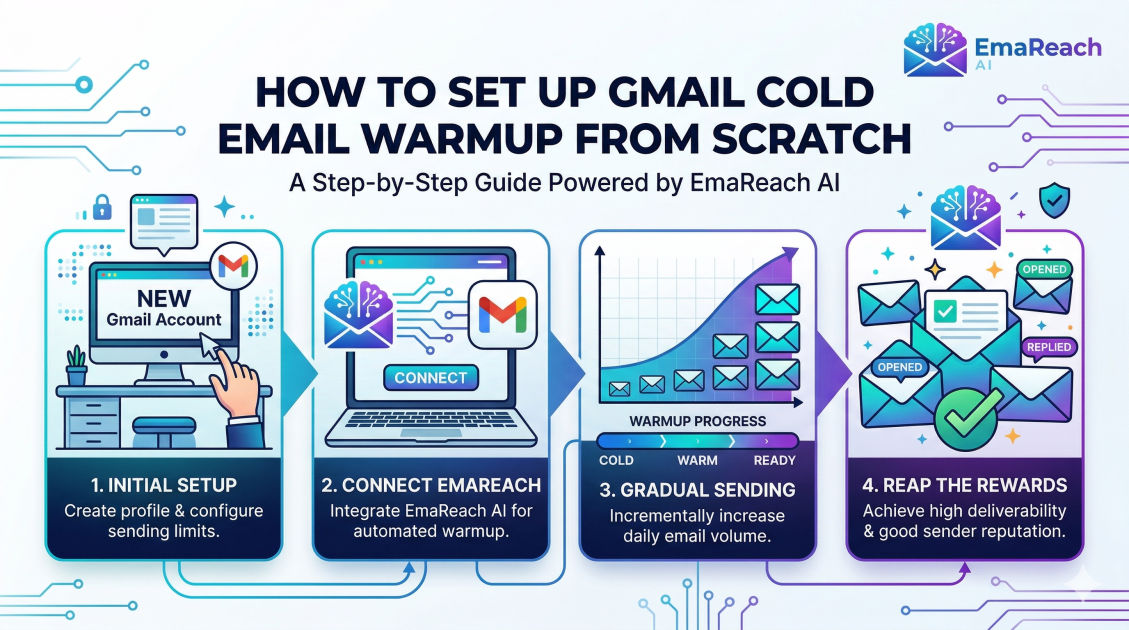
How to Set Up Gmail Cold Email Warmup from Scratch
cold emailemail deliverabilityemail warmupGoogle Workspacesales outreachB2B marketing
Introduction
Cold email remains one of the most powerful, predictable, and scalable acquisition channels for business-to-business (B2B) growth. However, the landscape of email outreach has dramatically shifted over time. Gone are the days when you could simply purchase a list of thousands of prospects, load them into a sending tool, blast a generic message, and watch the replies roll in. Today, email service providers (ESPs), with Google’s Gmail leading the charge, utilize sophisticated machine learning algorithms to fiercely protect their users from unsolicited, irrelevant, or malicious emails.
If your emails land in the spam folder, your cold outreach campaign is effectively dead on arrival. You cannot generate leads, book meetings, or close deals if your prospects never see your message. The critical bridge between pressing "send" and landing safely in the prospect's primary inbox is a process known as email warmup.
Email warmup is the systematic, gradual process of establishing a positive sender reputation for a new email account and domain. By slowly increasing the volume of emails sent and ensuring high engagement rates (opens, replies, forwards), you signal to Google and other ESPs that you are a legitimate human sender, not a spammer.
This comprehensive guide will walk you through exactly how to set up a Gmail cold email warmup process from scratch, covering everything from technical domain authentication to manual sending schedules, automated warmup strategies, and long-term deliverability maintenance.
Section 1: Understanding Email Reputation and the Sandbox
Before diving into the technical setup, it is crucial to understand how Google evaluates your email account. When you register a new domain and set up a new Google Workspace account, your domain has zero reputation. You are essentially a stranger knocking on Google's door.
Because spammers frequently buy new domains and immediately send thousands of emails, ESPs automatically place new domains into what the industry calls a "sandbox." During this probationary period, your emails are heavily scrutinized. Any sudden spike in sending volume, low open rates, high bounce rates, or spam complaints will instantly tank your deliverability and permanently damage your domain's sender score.
Your sender reputation is influenced by three main factors:
- Domain Reputation: How trustworthy your website domain is.
- IP Reputation: The trustworthiness of the IP address from which your emails are sent (luckily, by using Google Workspace, you piggyback on Google's highly trusted shared IP addresses).
- Content Reputation: The words, links, and formatting used in your actual email copy.
Email warmup primarily focuses on building your domain reputation. By generating artificial or carefully controlled organic engagement, you teach the algorithms that your domain is trustworthy and deserves primary inbox placement.
Section 2: Building the Foundation (Technical Setup)
Before you send a single email, you must build a solid foundation. Attempting to warm up an email address without proper technical authentication is like trying to board an international flight without a passport; you simply will not make it past security.
Choose the Right Domain Strategy
Never use your primary company domain (e.g., yourcompany.com) for cold email outreach. If your cold email campaigns receive high spam complaints, your primary domain's reputation will be ruined, which means your day-to-day transactional emails, customer support responses, and internal communications will start landing in spam.
Instead, purchase secondary, variations of your main domain. For example, if your primary domain is acmecorp.com, you should buy variations like:
getacmecorp.comtryacmecorp.comacmecorphq.comacmecorpmail.com
Set up seamless redirects so that if a prospect types your secondary domain into their browser, they are automatically forwarded to your main website.
Google Workspace Setup
Once you have your secondary domains, set them up on Google Workspace. Google Workspace (formerly G Suite) is the gold standard for cold email because of its superior deliverability infrastructure. Create distinct user accounts (inboxes) for your outreach, such as john@getacmecorp.com or hello@tryacmecorp.com.
The Holy Trinity of Email Authentication: SPF, DKIM, and DMARC
To prove to receiving servers that you are who you say you are, you must configure three DNS records within your domain registrar (such as GoDaddy, Namecheap, or Cloudflare).
1. SPF (Sender Policy Framework): SPF acts as a public guest list for your domain. It is a TXT record added to your DNS that lists all the IP addresses and servers permitted to send emails on behalf of your domain. When you use Google Workspace, your SPF record simply tells receiving servers, "Google is allowed to send emails for me."
2. DKIM (DomainKeys Identified Mail): DKIM acts as a digital, cryptographic signature attached to every email you send. It ensures that the email was not altered or tampered with while in transit. You will generate a unique DKIM key inside your Google Workspace admin console and add it as a TXT record in your DNS settings.
3. DMARC (Domain-based Message Authentication, Reporting, and Conformance):
DMARC ties SPF and DKIM together. It tells the receiving server exactly what to do if an email fails the SPF or DKIM checks. A strict DMARC policy protects your domain from being spoofed by malicious actors. When starting, you should set your DMARC policy to p=none, which allows you to monitor authentication without blocking emails.
Complete this setup and use a free online tool to verify that your SPF, DKIM, and DMARC records are correctly propagated before proceeding.
Section 3: The Profile Optimization Phase
Spam filters also look for signs of human authenticity. An empty Google Workspace account with no profile picture and zero account activity looks suspicious.
Take the time to humanize your new inboxes:
- Add a Profile Picture: Upload a clear, professional headshot of the sender. This picture will appear in the prospect's inbox, increasing trust and open rates.
- Set Up an Email Signature: Keep it clean and simple. Include your name, title, company name, and a standard text link to your website. Avoid heavy HTML elements or large image banners in your signature during the warmup phase.
- Subscribe to Newsletters: Use your new email address to subscribe to 10-15 industry newsletters. This ensures your inbox starts receiving incoming mail, which mimics normal user behavior and signals to Google that this is an active, receiving inbox.
Section 4: The Manual Warmup Phase (Days 1 to 14)
With your technical foundation secure, it is time to start sending. However, patience is paramount. You must simulate the behavior of a normal human who just created a new email account.
During the first two weeks, your goal is to generate 100% positive engagement. This means every email you send should ideally be opened, read, and replied to. The only way to guarantee this is through manual warmup.
The Manual Sending Schedule
Follow a strict, conservative ramp-up schedule:
- Days 1-3: Send 2 to 5 emails per day.
- Days 4-7: Send 5 to 10 emails per day.
- Days 8-14: Send 10 to 20 emails per day.
Who to Email Manually
Do not email your prospects yet. Instead, email people you know will respond favorably:
- Colleagues and Coworkers: Ask your team members to exchange emails with your new account.
- Personal Inboxes: Send emails to your personal Gmail, Yahoo, and Outlook accounts.
- Business Partners: Reach out to friendly vendors or partners who won't mind a quick "testing my new email" message.
Generating the Right Engagement Signals
Sending the email is only half the battle. The recipient must perform specific actions to build your reputation:
- Open the email: High open rates are the strongest positive signal.
- Reply to the email: A thoughtful text reply (not just a single word) shows genuine conversation.
- Mark as Important: Have the recipient click the yellow "important" marker in Gmail.
- Rescue from Spam: If your email lands in their spam folder, it is critical that they click "Report as not spam" and move it to the primary inbox. This is the most powerful signal you can give an algorithm.
- Forward the email: Occasional forwarding shows high value.
Write conversational, normal emails. Ask questions about their weekend, share a recipe, or discuss an industry news topic. Do not include any links, attachments, or sales jargon in these early manual emails.
Section 5: Transitioning to Automated Warmup
After two weeks of manual warmup, maintaining the process manually becomes a massive drain on your time, especially if you plan to scale your outreach across multiple domains and inboxes. This is the time to leverage technology.
Automated email warmup tools connect to your inbox and automatically send, receive, open, and reply to emails on your behalf. They operate within a massive peer-to-peer network of other users' real inboxes, creating a closed loop of guaranteed positive engagement.
This is where dedicated tools become indispensable. For instance, you can use platforms like EmaReach to automate this process. EmaReach AI combines AI-written cold outreach with inbox warm-up and multi-account sending—so your emails land in the primary tab and get replies. Stop landing in spam and let the tool handle the complex peer-to-peer sending algorithms.
How Automated Warmup Works
When you connect your inbox to a warmup tool, the software begins executing a predetermined schedule:
- It sends emails to other inboxes in the network.
- If your email lands in the spam folder of a network peer, the tool automatically retrieves it, marks it as "not spam," and moves it to the primary inbox.
- It opens your emails and reads them.
- It generates realistic, AI-driven replies to your emails, simulating long-thread conversations.
- It automatically archives these warmup emails in a hidden folder so they do not clutter your actual workspace.
Automated Warmup Configuration
Set your automated warmup tool to slowly increase volume. A good rule of thumb is to increase by 2 to 3 emails per day until you reach a maximum limit of around 35 to 40 warmup emails per day. Keep your reply rate setting relatively high, between 30% and 45%, to maintain a strong engagement profile.
Section 6: Launching Your Cold Outreach Campaign
By Week 3 or Week 4, your domain reputation should be strong enough to begin actual cold outreach. However, you cannot suddenly stop the warmup process and blast 500 prospects. The transition must be seamless.
Blending Warmup with Live Campaigns
The secret to long-term deliverability is blending. You must continue running your automated warmup in the background while you slowly introduce real cold emails.
Your warmup emails act as a buffer. Real cold outreach naturally generates lower open rates, fewer replies, and occasional spam complaints. By running warmup simultaneously, the guaranteed 100% engagement from the warmup tool artificially inflates your overall inbox metrics, offsetting the negative signals generated by your cold campaigns.
The Golden Sending Limits
While Google Workspace technically allows you to send up to 2,000 emails per day per account, hitting this limit with cold outreach will guarantee a swift suspension.
For optimal safety and deliverability, you should aim for a maximum total volume of 50 to 75 emails per day per inbox. This total number includes both your real cold emails and your automated warmup emails.
For example, a healthy, fully warmed inbox schedule might look like this:
- 35 Automated Warmup Emails
- 40 Real Cold Emails
- Total: 75 Emails per day.
If you need to contact 1,000 prospects per day, the solution is not to send 1,000 emails from one inbox. The solution is horizontal scaling: setting up 25 to 30 different inboxes across multiple secondary domains, each sending a safe volume of 40 cold emails per day.
Section 7: Deliverability Best Practices During Outreach
Even with a perfectly warmed domain, bad habits can ruin your reputation. Protect your investment by adhering to these strict best practices:
1. Optimize Your Email Copy
Spam filters aggressively scan your content. Avoid heavy HTML formatting. Cold emails should look exactly like an email you would send to a coworker: plain text, simple structure, and minimal formatting.
Avoid spam trigger words entirely. Phrases like "Buy now," "Free trial," "Guaranteed ROI," "Urgent," or "100% free" will trip algorithmic wires. Focus on providing value and asking low-friction questions instead of pitching.
2. Limit Links and Tracking
In your first point of contact, try to include zero links. No calendar links, no website links, no attachments. Your goal in the first email is solely to generate a reply. Once they reply, you can safely send a link.
Furthermore, disable open and click tracking if possible. Tracking pixels are frequently flagged by security firewalls and spam filters. If you must use tracking, set up a Custom Tracking Domain (CTD) so your tracking links match your sender domain rather than the shared tracking domain of your sending software.
3. Hyper-Personalization
Spam filters recognize duplicate content. If you send the exact same template to 500 people, it looks like a mass blast. Use advanced personalization variables to ensure every single email is mathematically unique. Beyond standard placeholders like {{First_Name}} and {{Company}}, incorporate custom first lines based on their LinkedIn activity, recent company news, or specific pain points.
4. Maintain Pristine Lead Data
Sending emails to invalid addresses causes "hard bounces." If your bounce rate creeps above 2% or 3%, ESPs will penalize your domain. Always run your prospect lists through a reputable email verification service before launching a campaign. Never guess email addresses, and immediately remove any contacts that bounce.
Section 8: Ongoing Monitoring and Maintenance
Email deliverability is not a "set it and forget it" task. It requires continuous vigilance.
Regularly monitor your sender reputation using tools like Google Postmaster Tools, which provides direct insights from Google regarding your domain's spam rate, IP reputation, and authentication success.
Check your domains against popular blacklists on a weekly basis. If you notice a sudden drop in open rates (e.g., dipping below 40%), pause your active cold campaigns immediately. Let the automated warmup run exclusively for a week or two to rehabilitate your reputation before slowly resuming outreach.
Conclusion
Setting up a Gmail cold email warmup from scratch is a meticulous process that demands patience, technical precision, and a deep understanding of how email service providers evaluate sender behavior. By establishing proper authentication protocols (SPF, DKIM, DMARC), executing a controlled manual warmup, leveraging automated peer-to-peer warmup networks, and adhering to strict daily sending limits, you build an ironclad sender reputation. This foundation ensures that your highly targeted, personalized outreach bypasses the spam folder entirely, landing directly in your prospects' primary inboxes where it can drive meaningful conversations and revenue growth. Diligence in the warmup phase translates directly to the ultimate success and longevity of your cold email campaigns.
EmaReach AI
Ready to scale your cold email outreach?
Join thousands of teams using EmaReach AI for AI-powered campaigns, domain warmup, and 95%+ deliverability. Start free — no credit card required.
Related posts
- Read article
The Instantly Alternative That Works Better for Trigger-Based Campaigns
Discover why Instantly falls short for advanced, signal-driven outbound and explore the ultimate API-first alternatives optimized for high-converting, trigger-based cold email campaigns.
- Read article
The Instantly Alternative That Handles High Bounce Rates Without Panic
Discover how transitioning to an advanced Instantly alternative can safeguard your cold email infrastructure. Learn to handle high bounce rates effortlessly using real-time verification, smart mailbox rotation, and automated safety nets to protect your sender reputation and maintain consistent primary inbox placement.