Blog
Back to blog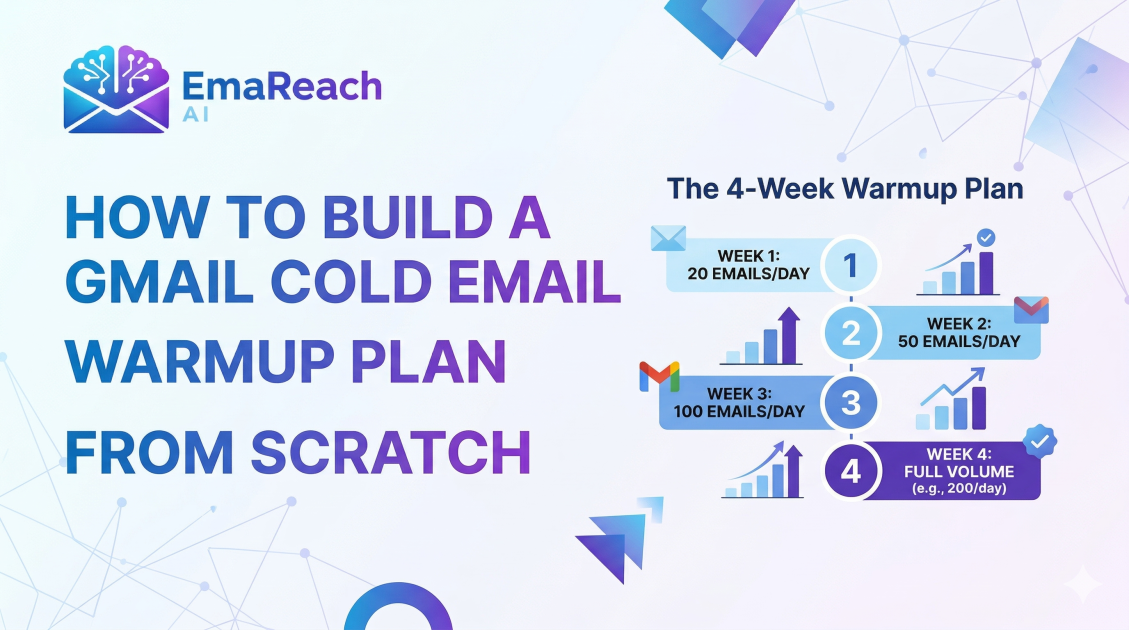
How to Build a Gmail Cold Email Warmup Plan from Scratch
cold emailemail deliverabilitygmail warmupemail marketingoutreach strategysender reputation
Introduction to Email Warmup
Building a cold email campaign is often seen as a numbers game, but the reality is more nuanced. Before you can ever hope to book a meeting or close a deal, your email must first land in the recipient's primary inbox. For Gmail users, this is a significant hurdle. Google employs some of the most sophisticated spam filters in the world, designed to protect users from unsolicited and potentially harmful content. If you take a brand-new Gmail account and immediately send 100 outbound emails, the system will flag your behavior as suspicious, leading to your messages being relegated to the spam folder—or worse, your account being suspended.
This is where an email warmup plan becomes essential. Email warmup is the process of gradually increasing the volume of emails sent from a new email account to build a positive sender reputation with Internet Service Providers (ISPs). Think of it as a marathon runner training for a big race; you wouldn't run 26 miles on your first day of training. You start small, build endurance, and prove your reliability over time.
In this guide, we will break down exactly how to build a Gmail cold email warmup plan from scratch, covering technical setup, engagement strategies, and the slow-burn schedule required for long-term deliverability success.
The Psychology of Spam Filters
To build an effective warmup plan, you must understand what Google’s algorithms are looking for. Spam filters track several key metrics to determine if you are a legitimate sender or a bot:
- Sending Volume Consistency: Sudden spikes in volume are a major red flag.
- Engagement Rates: Do people open your emails? Do they reply? Do they move them from the 'Promotions' tab to the 'Primary' tab?
- Bounce Rates: Sending to non-existent addresses suggests you are using a poor-quality, scraped list.
- Marked as Spam: If users manually report your email as spam, your reputation takes a massive hit.
- Technical Authentication: Is your domain verified, or does it look like a spoofed account?
By following a structured warmup plan, you mimic the behavior of a real human being using Gmail for professional communication, which earns the trust of the Google ecosystem.
Phase 1: The Technical Foundation
Before you send a single warmup email, your technical infrastructure must be flawless. Without these three pillars of authentication, your warmup efforts will be wasted.
SPF (Sender Policy Framework)
SPF is a DNS record that specifies which mail servers are authorized to send emails on behalf of your domain. It prevents spammers from using your domain to send unauthorized emails. For Gmail, ensuring your SPF record includes _spf.google.com is non-negotiable.
DKIM (DomainKeys Identified Mail)
DKIM adds a digital signature to your emails. This allows the receiving server to verify that the email was indeed sent from your domain and that it hasn't been altered during transit. It’s like a wax seal on a medieval letter; it proves authenticity.
DMARC (Domain-based Message Authentication, Reporting, and Conformance)
DMARC uses SPF and DKIM to give the receiving mail server instructions on what to do if an email fails authentication. Setting up a DMARC policy (even a 'none' policy to start) tells Google that you are serious about security and domain health.
Phase 2: Preparing the Account for Human Behavior
A blank Gmail profile looks suspicious. Before starting the sending schedule, take the following steps to 'humanize' the account:
- Set up a Profile Picture: Upload a professional headshot. Accounts with default avatars are more likely to be flagged.
- Create an Email Signature: Include your name, title, company name, and a physical address (required by law in many jurisdictions). Avoid using too many links or images in the signature during the warmup phase.
- Enable Two-Factor Authentication (2FA): This increases the security score of your account in Google’s eyes.
- Subscribe to Newsletters: Sign up for 5-10 high-quality newsletters (like Harvard Business Review or industry-specific blogs). Receiving incoming mail is just as important as sending outgoing mail for building a balanced reputation.
Phase 3: The Manual Warmup Schedule
If you are building this plan from scratch without automated tools, you must be disciplined. The goal is to gradually scale up over a period of 4 to 8 weeks.
Week 1: The First Contact
- Daily Volume: 2-5 emails per day.
- Recipients: Friends, colleagues, or your own secondary email addresses.
- Strategy: Every email sent must receive a reply. These should be natural conversations. Ask a question in your email, and have the recipient answer it. If the email lands in 'Promotions' or 'Spam' during this phase, have the recipient manually move it to the 'Primary' inbox.
Week 2: Expanding the Circle
- Daily Volume: 5-10 emails per day.
- Recipients: Known contacts and perhaps a few cold leads who are highly likely to engage.
- Strategy: Maintain a reply rate of at least 50%. Continue the newsletter subscriptions and ensure you are opening and clicking links within those incoming newsletters.
Week 3: Introducing Variation
- Daily Volume: 10-20 emails per day.
- Recipients: A mix of known contacts and low-risk cold prospects.
- Strategy: Start varying the subject lines and body copy. Spam filters look for repetitive patterns. If you send the exact same text 20 times, it triggers a 'template' flag. Use 'Spintax' or manual variations to keep the content fresh.
Week 4: Scaling Toward Outreach
- Daily Volume: 20-30 emails per day.
- Recipients: Primarily cold leads, but maintain 5-10 'safe' emails to friendly contacts to keep engagement metrics high.
- Strategy: Monitor your bounce rate closely. If more than 2% of your emails bounce, stop immediately and clean your lead list. High bounce rates during warmup are a death sentence for a new Gmail account.
Phase 4: Content Best Practices During Warmup
What you write is just as important as how many emails you send. During the warmup phase, your content should be "ultra-safe."
- Avoid Spam Triggers: Words like "Free," "Guarantee," "Double your income," or "Act now" should be avoided. These are scanned by Google’s Natural Language Processing (NLP) engines and can lower your score.
- Minimize Links: Do not include more than one link in your email. In the first two weeks, it is better to include no links at all.
- No Attachments: Attachments are a common vector for malware. Sending them from a new account is highly risky.
- Plain Text is King: Avoid complex HTML formatting. Professional, plain-text emails look more like personal correspondence and less like marketing blasts.
Monitoring Your Reputation
How do you know if your plan is working? You need to monitor your progress using external tools and internal indicators.
- Google Postmaster Tools: This is a free resource provided by Google. It gives you insights into your IP and domain reputation, spam rate, and delivery errors. If your domain reputation drops from 'High' to 'Medium,' you must scale back your volume immediately.
- Manual Testing: Once a week, send a test email to a personal Gmail account that hasn't interacted with your warmup account yet. Check where it lands. If it’s in the Primary tab, you are on the right track.
The Role of Engagement and "Reverse Warmup"
One often overlooked aspect of a Gmail warmup plan is the "Reverse Warmup." This involves you being an active user of the Gmail interface.
- Archiving and Labeling: Don't just let emails sit in your inbox. Organize them. This shows Google you are actively managing the account.
- Prompt Replies: If you get a reply to your warmup emails, respond within a few hours. This signals that the account is being used for real-time communication.
- Marking as Not Spam: If any of the newsletters you subscribed to land in spam, move them to the inbox. This trains the filter that you are an active participant in determining what is and isn't valuable to you.
Transitioning to Full Outreach
Once you have completed 4-6 weeks of warmup and your daily volume is around 30-50 emails without any deliverability issues, you can transition into your full cold email campaign. However, the warmup never truly ends. Even after the initial phase, you should maintain a baseline of engagement emails to keep the reputation 'warm.'
If you find that manual warmup is too time-consuming or that you need to scale across dozens of accounts simultaneously, you might consider advanced platforms. For instance, EmaReach (https://www.emareach.com/) provides a comprehensive solution: "Stop Landing in Spam. Cold Emails That Reach the Inbox." Their system combines AI-driven writing with automated inbox warmup and multi-account sending, ensuring your emails stay in the primary tab even as you scale.
Troubleshooting Common Issues
Even with the best plan, you might hit a snag. Here is how to handle common warmup hurdles:
Problem: My emails started going to spam.
Solution: Stop all outbound sending for 48 hours. Then, resume at 25% of the previous volume. Increase the number of 'safe' replies from friends and colleagues. Check Google Postmaster Tools to see if your domain reputation has been flagged.
Problem: My account was suspended.
Solution: Follow the appeal process. Usually, Google will ask you to verify a phone number. If it happens repeatedly, your technical setup (SPF/DKIM) is likely broken, or your content is too aggressive. Review your DNS records immediately.
Problem: High bounce rates.
Solution: Your lead list is the problem. Use a verification service to prune dead emails. Never send to 'catch-all' addresses during the warmup phase.
Conclusion
Building a Gmail cold email warmup plan from scratch requires patience, precision, and a deep understanding of how Google perceives sender behavior. By starting with a solid technical foundation, humanizing your account, and strictly following a gradual scaling schedule, you can build a sender reputation that ensures your cold outreach actually gets read. Remember, the goal of warmup isn't just to 'trick' the system—it's to prove that you are a legitimate, high-value sender in the global email ecosystem. Stay consistent, monitor your metrics, and prioritize engagement over volume to achieve long-term deliverability success.
EmaReach AI
Ready to scale your cold email outreach?
Join thousands of teams using EmaReach AI for AI-powered campaigns, domain warmup, and 95%+ deliverability. Start free — no credit card required.
Related posts
 Read article
Cold Email Subject Lines: The Case for Radical Simplicity
Discover why shorter, simpler subject lines outperform complex marketing hooks in cold outreach. Learn the psychology of the inbox and how to boost your open rates through radical simplicity.

Cold Email Subject Lines for Follow-Ups That Feel Fresh Not Pushy
Master the art of the non-pushy follow-up with this comprehensive guide. Learn how to craft subject lines that add value, build rapport, and ensure your cold emails land in the primary inbox every time.
