Blog
Back to blog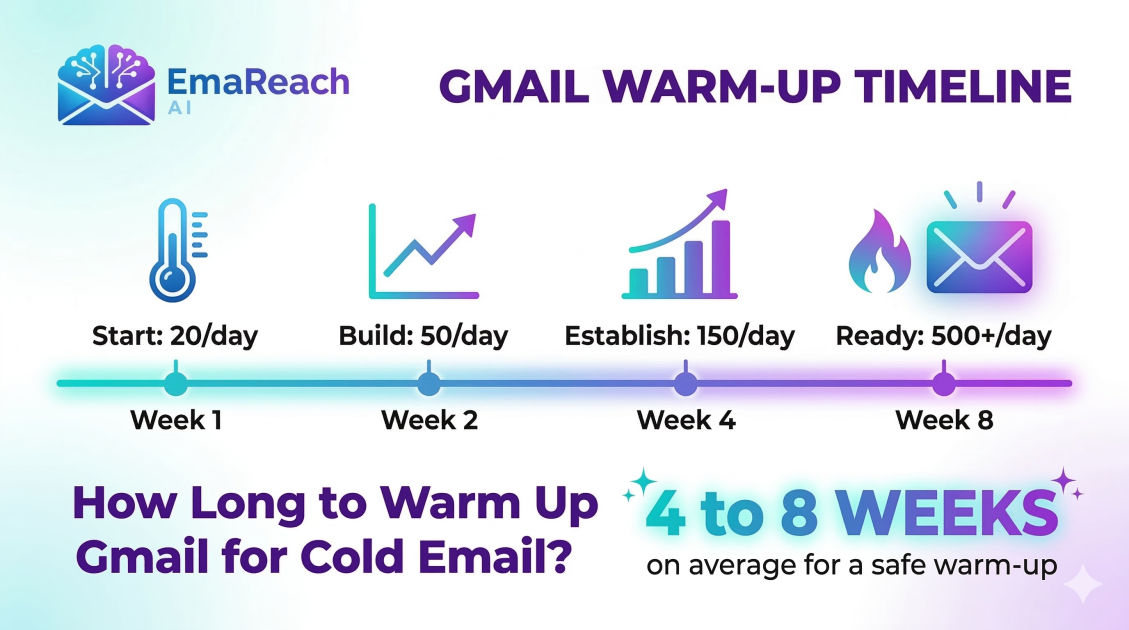
How Long Does It Take to Warm Up Gmail for Cold Email?
cold emailemail deliverabilitygmail warm-upoutreach strategysender reputationemail marketing
Introduction to Gmail Warm-Up
Launching a cold email campaign is often met with a mix of excitement and anxiety. You have the perfect offer, a curated list of prospects, and a compelling script. However, before you hit 'send' on hundreds of messages, there is a technical hurdle that determines whether your campaign succeeds or disappears into the void: email deliverability. Specifically, for those using Gmail or Google Workspace, the process of 'warming up' your account is the most critical phase of the journey.
But how long does it actually take? Is it a matter of days, or does it require months of patient preparation? This guide explores the intricate timelines of Gmail warm-up, the variables that influence your deliverability, and the best practices to ensure your emails land in the primary inbox rather than the spam folder.
Why Warm-Up is Mandatory for Gmail
Google’s primary responsibility is to protect its users from spam, phishing, and irrelevant content. When a brand-new Gmail account suddenly starts sending 50 or 100 emails a day, it triggers an immediate red flag in Google’s algorithms. To the automated filters, this behavior looks exactly like a bot or a professional spammer who has just purchased a domain to blast out junk mail.
Warm-up is the process of gradually increasing your email volume to build a positive sender reputation. By starting small and mimicking human behavior, you signal to Google that you are a legitimate sender. A well-warmed account suggests that people want to read your emails, reply to them, and move them out of the 'Promotions' or 'Spam' tabs.
The Standard Timeline: How Long Does It Take?
While every domain and use case is slightly different, the industry standard for a comprehensive Gmail warm-up is 8 to 12 weeks. However, this doesn't mean you can't send any emails before then. It simply means that your account reaches its 'peak' performance and safety after roughly two to three months of consistent activity.
Phase 1: The Infancy Stage (Weeks 1-2)
In the first fourteen days, your volume should be extremely low. You are essentially teaching the algorithm that this account exists and is operated by a human. Sending more than 10-20 emails per day during this window is high-risk. This is the period where the 'foundation' is laid.
Phase 2: The Growth Stage (Weeks 3-4)
During this phase, you can begin to scale. If your engagement rates (opens and replies) remain high, you can start increasing your daily limit by 5-10 emails every few days. By the end of week four, a healthy account might be sending 40-50 emails per day without issue.
Phase 3: The Maturity Stage (Month 2 and Beyond)
By the second month, your sender reputation is becoming established. You can continue to scale toward your target volume. Most experts recommend capping cold email accounts at 50-75 emails per day per inbox to maintain long-term health. If you need to send 500 emails a day, the answer isn't to send more from one account, but to warm up ten different accounts.
Factors That Influence the Warm-Up Duration
Not all Gmail accounts are created equal. Several variables can speed up or slow down your timeline significantly.
Domain Age
A brand-new domain (e.g., yourcompany-outreach.com registered yesterday) requires a much longer warm-up period than an established domain that has existed for years. New domains have 'zero' reputation, making them subject to stricter scrutiny by Google’s filters.
Technical Setup (SPF, DKIM, DMARC)
Before you even send your first warm-up email, your technical records must be perfect.
- SPF (Sender Policy Framework): Specifies which mail servers are authorized to send email on behalf of your domain.
- DKIM (DomainKeys Identified Mail): Adds a digital signature to your emails, proving they weren't tampered with.
- DMARC (Domain-based Message Authentication, Reporting, and Conformance): Tells receiving servers what to do if an email fails SPF or DKIM. If these aren't set up, your warm-up will fail, regardless of how long you wait.
Engagement Metrics
Warm-up isn't just about sending; it’s about the reception. If people reply to your emails, mark them as 'important,' or move them from 'Spam' to the 'Inbox,' your reputation skyrockets. If they delete them without opening or mark them as spam, your warm-up timeline will be extended indefinitely as you try to dig yourself out of a 'reputation hole.'
Manual vs. Automated Warm-Up
The Manual Method
In the early days of cold outreach, marketers warmed up accounts manually. They would email colleagues, friends, and their own secondary accounts, asking for replies. While effective, this is nearly impossible to scale and highly prone to human error. It’s difficult to maintain the consistent, daily increase in volume required to fool a sophisticated algorithm.
The Automated Method
Modern outreach requires automation. Using a dedicated warm-up service allows you to join a network of thousands of other accounts that interact with yours. These tools automatically send emails, open them, move them to the inbox, and even reply to them using AI-generated text. This creates the 'perfect' engagement profile in the eyes of Google.
For those looking to streamline this entire process, EmaReach offers a powerful solution. Stop Landing in Spam. Cold Emails That Reach the Inbox. EmaReach AI combines AI-written cold outreach with inbox warm-up and multi-account sending—so your emails land in the primary tab and get replies. This type of integration ensures that the warm-up is not just a separate task, but a continuous safety net for your outreach.
The Risks of Rushing the Process
It is tempting to try and 'hack' the timeline. You might think, "Why wait 8 weeks when I can start sending 100 emails tomorrow?" The consequences of rushing are severe and often permanent:
- Permanent Blacklisting: Your domain could be added to global blacklists (like Spamhaus), making it nearly impossible to send email to any professional inbox, not just Gmail users.
- Domain Reputation Damage: Once a domain is flagged as 'spammy,' it is incredibly difficult to recover. You may find that even your 1-to-1 personal emails start landing in the spam folders of your clients and partners.
- Account Suspension: Google Workspace has the right to suspend accounts that violate their terms of service regarding bulk sending. This can disrupt your entire business operation.
Step-by-Step Gmail Warm-Up Schedule
If you are starting from scratch today, here is a recommended schedule to maximize your deliverability:
Week 1: The Setup
- Register your domain and set up Google Workspace.
- Configure SPF, DKIM, and DMARC.
- Enable the warm-up tool of your choice.
- Set the tool to send 2-5 emails per day.
- Ensure the 'reply rate' in your warm-up tool is set to at least 30%.
Week 2-3: The Gradual Climb
- Increase the daily limit by 2-3 emails every day.
- Monitor your 'spam' placement via your warm-up dashboard.
- Begin sending 5-10 very personalized, manual emails to people you know will respond.
Week 4-6: Scaling Up
- Aim for a volume of 30-40 emails per day.
- By now, your 'Inbox Placement' should be consistently above 95%.
- Start testing small batches of your actual cold email copy (only 5-10 per day) to see how the market reacts.
Week 8+: Full Launch
- Maintain a total volume (warm-up emails + cold outreach) of 50-75 emails per day.
- Never turn off your warm-up tool. Even when you are in 'full production,' the warm-up tool acts as a buffer, maintaining high engagement rates even if your cold prospects aren't replying at a high frequency.
Advanced Tips for Better Deliverability
Use a Separate Domain
Never use your primary company domain (e.g., yourcompany.com) for cold outreach. If something goes wrong during the warm-up or a campaign, you don't want your primary business communication to be affected. Use a 'lookalike' domain like get-yourcompany.com or yourcompany-app.com.
Personalization is Part of Warm-Up
The content of your emails matters. Google’s AI can read. If you send 50 identical emails with the exact same subject line and body text, it looks like a template. Using dynamic tags and AI-driven personalization helps each email look unique, which is a key characteristic of human-to-human communication.
Monitor Your 'Spam' Rate
Keep a close eye on your Google Postmaster Tools. It provides data on your domain reputation and spam rate directly from Google’s perspective. If you see your spam rate creeping above 0.1%, it’s time to pause your cold outreach and go back to a 'warm-up only' mode for a week or two.
Common Myths About Gmail Warm-Up
Myth 1: You can warm up an account in 48 hours. This is the fastest way to get banned. While some tools claim 'express' warm-up, the physics of email reputation don't allow for it. Trust takes time to build.
Myth 2: Once you are warmed up, you are safe forever. Reputation is fluid. If you stop using an account for a month and then suddenly send 100 emails, you will be flagged. Warm-up is a continuous process that should run in the background of your campaigns indefinitely.
Myth 3: You don't need a warm-up tool if you have a high-quality list. Even if your list is perfect, the volume is what triggers the filters. A high-quality list ensures you don't get 'marked as spam' by users, but it doesn't solve the 'new sender' problem with Google's automated filters.
Conclusion
Warming up a Gmail account for cold email is not a sprint; it is a marathon. To ensure the long-term success of your outreach efforts, you must commit to a minimum of 8 to 12 weeks of gradual scaling. By focusing on technical health, consistent engagement, and the right automation tools, you can build a sender reputation that bypasses the spam filters and puts your message in front of your ideal customers.
Remember, the goal of cold email is to start conversations. Those conversations can only happen if your emails are seen. Take the time to warm up properly, use tools like EmaReach to maintain your standing, and prioritize deliverability as the foundation of your sales engine. Without a properly warmed inbox, even the best sales copy in the world is just noise in a digital void.
EmaReach AI
Ready to scale your cold email outreach?
Join thousands of teams using EmaReach AI for AI-powered campaigns, domain warmup, and 95%+ deliverability. Start free — no credit card required.
Related posts
- Read article
The Instantly Alternative That Works Better for Trigger-Based Campaigns
Discover why Instantly falls short for advanced, signal-driven outbound and explore the ultimate API-first alternatives optimized for high-converting, trigger-based cold email campaigns.
- Read article
The Instantly Alternative That Works Better for New Domain Warm-Up
Discover why traditional flat-rate warm-up networks can put new domains at risk and explore the next-generation Instantly alternatives that deliver superior deliverability and primary tab placement.