Blog
Back to blog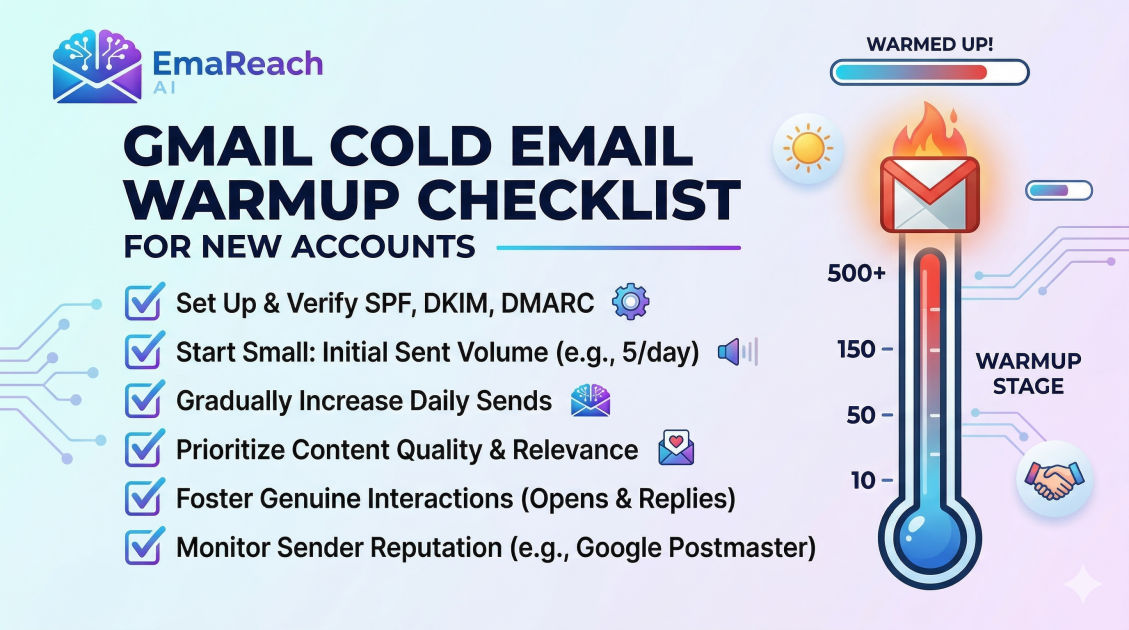
Gmail Cold Email Warmup Checklist for New Accounts
cold emailemail deliverabilitygmail warmupsales outreachb2b marketinglead generation
Introduction
Launching a cold email campaign from a brand-new Gmail or Google Workspace account is an exciting step for any business, but it comes with a hidden trap. If you immediately start blasting hundreds of pitches to prospects without taking the time to build trust with email service providers, your carefully crafted messages will bypass the inbox entirely and crash straight into the spam folder. Sending bulk emails from a fresh domain is the digital equivalent of a stranger walking up to a secure building and demanding immediate access. Before you can be trusted, you must prove your identity and establish a positive track record.
This process is known as email warmup. It is the methodical, gradual process of establishing a strong sender reputation for a new email account and domain. By simulating authentic, human-like email behavior over a period of several weeks, you signal to Gmail's sophisticated algorithms that you are a legitimate sender, not a spammer. A properly warmed-up account enjoys high deliverability rates, ensuring that your outreach efforts yield the maximum possible return on investment.
This comprehensive guide provides a detailed, step-by-step checklist to properly warm up your new Gmail account for cold outreach. From technical configurations to behavioral simulation and strategic scaling, following these steps will safeguard your domain reputation and help you consistently land in the primary inbox.
Understanding Sender Reputation and the Gmail Algorithm
Before diving into the checklist, it is crucial to understand how Gmail evaluates incoming mail. Google employs some of the most advanced spam filters in the world, utilizing machine learning algorithms that analyze thousands of data points for every single email sent globally.
Your sender reputation is essentially a credit score for your email domain and IP address. When you register a new domain, your sender reputation is neutral—which, in the eyes of email service providers, is inherently suspicious. Because spammers frequently purchase new domains to send junk mail until they are blocked, email providers treat all new domains with extreme skepticism.
To build a positive sender reputation, Google looks for specific engagement signals:
- Open Rates: Are recipients actually opening the emails you send?
- Reply Rates: Are people writing back to you? (This is the strongest positive signal).
- Forward and Save Rates: Are users forwarding your emails or moving them to specialized folders?
- Spam Complaints: Are recipients marking your messages as spam? (This is the strongest negative signal).
- Bounce Rates: Are you sending emails to addresses that do not exist?
If your account exhibits the behavior of a normal business professional—sending a reasonable volume of emails, receiving replies, and rarely bouncing—your reputation goes up. If you exhibit the behavior of a spammer—sending massive volumes instantly, getting low engagement, and hitting invalid addresses—your reputation tanks, and your domain may be permanently blacklisted.
Phase 1: The Technical Foundation (Before You Send a Single Email)
You cannot build a house without a foundation, and you cannot warm up an email account without properly authenticating your domain. Skipping these technical steps makes all subsequent warmup efforts useless.
1. Set Up Your Google Workspace Environment
When creating your new Google Workspace account, ensure that you fill out all administrative details accurately. Add a recovery email address and a phone number to verify your identity with Google. Security verifications help prove to Google that a real human being manages the account.
2. Configure SPF (Sender Policy Framework)
SPF is a DNS record that acts as a public guest list for your domain. It tells receiving email servers exactly which IP addresses and services are authorized to send emails on behalf of your domain. If an email arrives claiming to be from your domain but originates from an unlisted server, the receiving provider will flag it as suspicious. Setting up your SPF record correctly in your domain registrar's DNS settings is your first line of defense against spoofing.
3. Configure DKIM (DomainKeys Identified Mail)
DKIM adds a cryptographic signature to your emails. Think of it as a wax seal on a physical envelope. When you send an email, your server attaches a private key signature. The receiving server checks this signature against the public key listed in your DNS records. If they match, it proves that the email truly originated from your domain and that the contents were not altered in transit. You must generate a DKIM key within your Google Workspace admin console and add it to your DNS records.
4. Configure DMARC (Domain-based Message Authentication, Reporting, and Conformance)
DMARC ties SPF and DKIM together. It is a policy that instructs receiving servers on what to do if an email fails SPF or DKIM checks. For a new domain, you should start with a DMARC policy of p=none, which simply monitors traffic without rejecting emails. DMARC also provides reporting, allowing you to see if unauthorized parties are attempting to use your domain.
5. Set Up Custom Tracking Domains
If you plan to track open rates and link clicks in your cold emails, do not use the default tracking domains provided by your sending software. These default domains are shared among thousands of users, including spammers. Instead, set up a custom tracking domain using a CNAME record that points back to your primary domain. This isolates your sender reputation and prevents you from being penalized for the bad behavior of others.
Phase 2: Natural Account Maturation (Days 1 to 14)
Once the technical foundation is laid, the manual warmup phase begins. The goal here is to make your new Gmail account look exactly like a normal employee's new email address.
6. Complete Your Account Profile
Real people have profile pictures. Upload a clear, professional headshot to your Google Workspace profile. Set up a standard, text-based email signature. Avoid using heavy HTML signatures or multiple images in your signature during the warmup phase, as these can trigger spam filters.
7. Generate Inbound Email Flow
A normal inbox receives mail before it sends bulk mail. To simulate this, use your new email address to subscribe to various high-quality industry newsletters, SaaS product updates, and business publications. When these newsletters arrive in your inbox, open them, scroll through them, and occasionally click a link. This shows Google that your account is active and receiving legitimate correspondence.
8. Manual Peer-to-Peer Engagement
During the first two weeks, you should manually send a small number of emails to trusted colleagues, friends, or alternate accounts you control (preferably across different email providers like Outlook, Yahoo, and other Gmail accounts).
- Send 5 to 10 emails per day.
- Ask questions that require a response.
- Engage in multi-thread conversations.
If any of your test emails land in the spam folder of your trusted contacts, have them manually move the email to the primary inbox, mark it as "Not Spam," and reply to it. This teaches the algorithm that your messages are desired.
Phase 3: The Automated Warmup and Scaling Process
Manually sending and replying to emails becomes impossible to scale. This is where automated warmup tools and strategies come into play.
9. Integrating an Automated Warmup Solution
Automated warmup platforms connect to your inbox and send emails on your behalf to a network of other real inboxes. The software automatically opens, replies to, and marks your emails as important, generating the positive engagement signals required to build your reputation.
When transitioning to outreach, you want a system that handles both the sending and the reputation management seamlessly. Stop Landing in Spam. Cold Emails That Reach the Inbox. Integrating platforms like EmaReach can be a game-changer. EmaReach AI combines AI-written cold outreach with inbox warm-up and multi-account sending—so your emails land in the primary tab and get replies. Utilizing robust tools ensures your sender score remains high even as you scale.
10. The Ramp-Up Schedule
Whether you are using an automated tool or managing your sending volume meticulously, you must adhere to a strict ramp-up schedule. Never jump from sending 10 emails a day to 500.
- Week 1: 5 - 10 emails per day (Mostly manual, conversational).
- Week 2: 15 - 20 emails per day (Introduce automated warmup).
- Week 3: 25 - 35 emails per day (Begin blending in highly targeted, low-volume cold outreach).
- Week 4: 40 - 50 emails per day.
- Week 5 and beyond: Gradually increase by 5-10 emails per day until you reach your target volume, but try to keep your daily volume per inbox under 150-200 emails to remain completely safe.
Phase 4: Cold Email Content Best Practices During Warmup
As you begin to introduce actual cold outreach into your warmed-up inbox, the content of your messages plays a critical role in maintaining the reputation you have just built.
11. Avoid Spam Trigger Words
Algorithms scan your email copy for promotional language. Words and phrases like "Free," "Guarantee," "Act Now," "100%," "Crypto," or excessive use of exclamation points and all-caps will trigger spam filters. Keep your language conversational, professional, and entirely focused on providing value to the recipient.
12. Limit Links and Attachments
During the initial weeks of your cold outreach, your emails should contain as few links as possible. Ideally, your first touchpoint should be plain text with only your custom tracking domain link or a single link to your website. Never include attachments (like PDFs or Word documents) in a cold email, as these are heavily associated with malware distribution and will cause your emails to be blocked.
13. Use Spintax and Variable Personalization
Sending the exact same email template to hundreds of people is a massive red flag for Google. Use merge tags (like first name, company name, and custom icebreakers) to ensure every email is unique. Furthermore, utilize Spintax (spinning syntax) to vary greetings and sign-offs (e.g., rotating between "Hi," "Hello," and "Hey"). This variations make your sending patterns look organic rather than automated.
Phase 5: Monitoring Health and Troubleshooting
Warmup is not a one-time event; it is an ongoing process. Even after your account is fully mature, you must constantly monitor its health to ensure you do not inadvertently destroy your sender reputation.
14. Monitor Your Bounce Rate Relentlessly
Your bounce rate is the percentage of emails that fail to deliver because the recipient address is invalid. A high bounce rate is the fastest way to ruin a Gmail account. Always verify your lead lists using bulk email verification tools before sending. Keep your bounce rate strictly under 2%.
15. Set Up Google Postmaster Tools
Google Postmaster Tools is a free service that provides insights into how Gmail views your domain. Once you verify your domain, it will show you data on spam rates, IP reputation, domain reputation, and delivery errors. If you see your domain reputation slipping from "High" to "Medium" or "Low," immediately pause your cold outreach campaigns and increase your automated warmup volume to repair the damage.
16. Maintain Continuous Warmup
Do not turn off your automated warmup tool once you start sending cold campaigns. Your daily sending volume should consist of a mix of cold outreach and warmup emails. The guaranteed high-engagement signals from the warmup tool act as a buffer against the naturally lower engagement rates of cold emails, keeping your overall account metrics healthy.
The Ultimate Gmail Cold Email Warmup Checklist
To ensure you do not miss any critical steps, follow this consolidated checklist before launching your campaigns:
Technical Setup:
- Purchase a secondary domain specifically for cold outreach (e.g., if your main site is
company.com, buygetcompany.com). - Set up a new Google Workspace account with real user details.
- Configure the SPF record in your DNS settings.
- Generate and configure the DKIM record in your DNS settings.
- Configure a DMARC policy (
v=DMARC1; p=none;). - Set up a custom tracking domain for open and click tracking.
Profile Maturation:
- Add a professional profile picture to the Google account.
- Create a simple, text-based email signature.
- Subscribe to 10-15 industry newsletters to generate inbound traffic.
Manual Warmup (Days 1-14):
- Send 5-10 manual emails per day to trusted contacts.
- Ensure trusted contacts reply to your emails.
- Have contacts mark your emails as "Not Spam" if they land in the junk folder.
Automated Warmup & Scaling:
- Connect your inbox to a reliable automated warmup and outreach tool.
- Follow a strict ramp-up schedule, increasing volume by no more than 10-15 emails per week.
- Keep warmup running continuously, even after cold campaigns begin.
Campaign Safety:
- Verify all lead lists to ensure a bounce rate under 2%.
- Remove spam trigger words from your email copy.
- Remove all attachments and minimize links in initial cold emails.
- Use deep personalization and Spintax to ensure every email is unique.
- Monitor domain health weekly using Google Postmaster Tools.
Conclusion
Warming up a new Gmail account requires patience, precision, and a strategic approach. While it may be tempting to skip these steps and rush directly into sales outreach, doing so will inevitably result in burned domains, wasted leads, and lost revenue. By treating your sender reputation as a critical business asset and meticulously following this warmup checklist, you build an unbreakable foundation for your outreach infrastructure. A carefully matured email domain will bypass spam filters, reach your prospects directly, and ultimately serve as a reliable, long-term engine for your business's growth.
EmaReach AI
Ready to scale your cold email outreach?
Join thousands of teams using EmaReach AI for AI-powered campaigns, domain warmup, and 95%+ deliverability. Start free — no credit card required.
Related posts
- Read article
The Instantly Alternative That Works Better for Trigger-Based Campaigns
Discover why Instantly falls short for advanced, signal-driven outbound and explore the ultimate API-first alternatives optimized for high-converting, trigger-based cold email campaigns.
- Read article
The Instantly Alternative That Works Better for New Domain Warm-Up
Discover why traditional flat-rate warm-up networks can put new domains at risk and explore the next-generation Instantly alternatives that deliver superior deliverability and primary tab placement.