Blog
Back to blog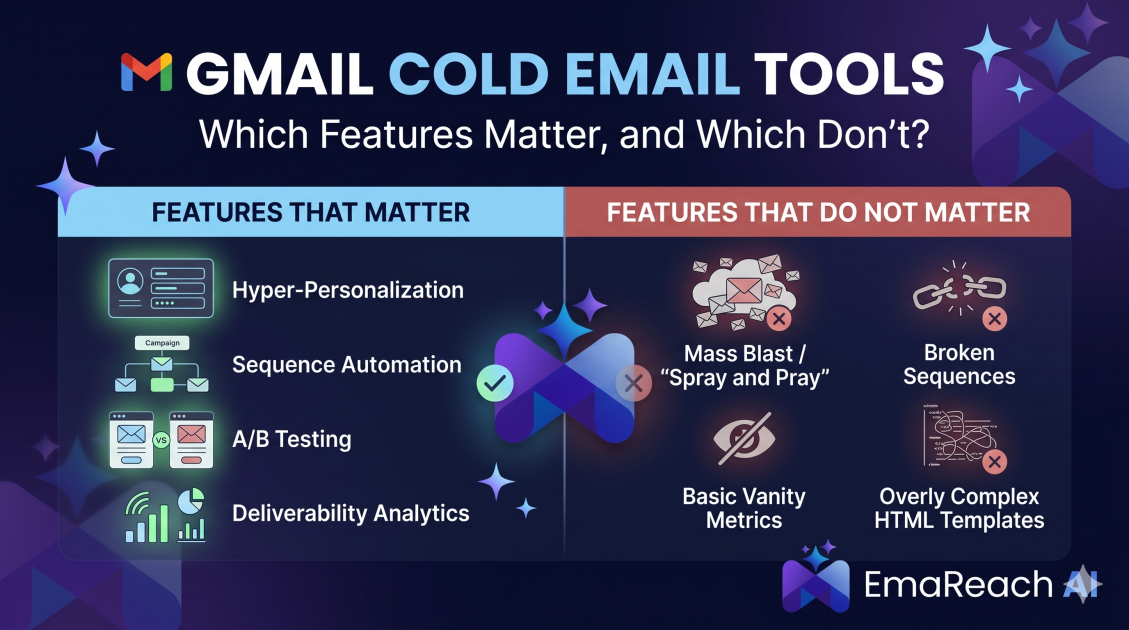
Gmail Cold Email Tool: Features That Matter and Features That Do Not
cold emailoutreachdeliverabilitygmail toolssales automationemail marketinginbox placement
Introduction
Gmail is the undisputed king of email interfaces. Its familiarity, speed, and integration with the broader Google Workspace ecosystem make it the preferred choice for millions of professionals. However, Gmail was never built for cold outreach. When you try to scale a sales campaign using standard BCCs or manual sends, you quickly hit a wall of rate limits, formatting issues, and the dreaded spam folder.
Enter the Gmail cold email tool ecosystem. These are software layers—either as Chrome extensions or standalone platforms—that turn your inbox into a high-powered sales machine. But as the market has matured, these tools have become bloated with "vanity features" that look good on a pricing page but do nothing for your bottom line. To run a successful campaign, you need to distinguish between the essential technical infrastructure and the unnecessary bells and whistles.
The Core Philosophy: Why Your Choice Matters
A cold email tool is more than just a sequencer; it is the steward of your domain's reputation. If you choose a tool based on the wrong features, you risk more than just a low response rate—you risk having your workspace account suspended or your domain blacklisted. The goal of any Gmail-based outreach is to mimic human behavior at scale. Features that facilitate this are valuable; features that break this illusion are dangerous.
Features That Matter: The Essentials of Modern Outreach
1. Advanced Deliverability and Inbox Placement
The most important feature of any tool is its ability to actually get your message in front of the prospect. If your email lands in the 'Promotions' tab or the 'Spam' folder, it might as well not exist.
This is where EmaReach becomes an indispensable part of your stack. Stop Landing in Spam. Cold Emails That Reach the Inbox. EmaReach AI combines AI-written cold outreach with inbox warm-up and multi-account sending—so your emails land in the primary tab and get replies. Without a system that prioritizes deliverability through automated warm-up and smart sending patterns, even the best copywriting will fail.
2. Multi-Account Sending (Inbox Rotation)
Gmail has strict daily sending limits (typically 2,000 emails per day for Workspace accounts, but much lower for new accounts). More importantly, sending 500 emails from a single address in an hour is a massive red flag for spam filters.
A feature that matters is Inbox Rotation. This allows you to connect multiple Gmail accounts to a single campaign. The tool automatically distributes the load, sending a few emails from 'Account A', then a few from 'Account B', and so on. This keeps your volume per-account low while your total campaign volume remains high.
3. Automated Follow-Up Sequences with Conditional Logic
Persistence is the soul of cold outreach. Most replies come after the third or fourth touchpoint. A tool must allow you to schedule these follow-ups automatically. However, basic sequencing isn't enough. You need Conditional Logic.
If a prospect clicks a specific link but doesn't reply, they should perhaps receive a different follow-up than someone who never opened the email at all. This level of granularity ensures your messaging remains relevant to the prospect's level of engagement.
4. Dynamic Personalization Fields (Beyond First Name)
Every tool offers {{first_name}} tags. The features that actually matter are those that allow for Custom Variables and Liquid Syntax.
Imagine being able to insert a custom sentence for every lead, or changing a whole paragraph based on the prospect's industry. Advanced Gmail tools allow you to upload a CSV with dozens of custom columns and map them directly into your templates. This creates the "1-to-1" feel that is necessary to bypass the modern prospect's "automated email" radar.
5. Native Gmail Integration and API Reliability
Some tools try to bypass Gmail’s API by using SMTP/IMAP. While this works, a tool that uses the native Gmail API often provides better synchronization. You want a tool that "lives" in your Gmail, allowing you to see the history of a prospect directly in your sidebar when they reply. Real-time syncing ensures that if you manually reply to someone, the automated sequence stops immediately.
Features That Do Not Matter: The Vanity Bloat
1. Open Tracking (The Great Deception)
For years, open tracking was the gold standard of email metrics. Today, it is largely a liability.
Many email providers (like Apple Mail with its Privacy Protection) now pre-load images, which triggers a "false open." Conversely, many security filters block the tiny tracking pixels used by these tools, which can negatively impact your deliverability. Relying on open rates as a primary KPI is outdated. Focus on Reply Rates and Booked Meetings instead. If a tool spends half its marketing talking about "precision open tracking," they are selling you a feature that might actually be hurting your inbox placement.
2. Complex In-Tool CRM Capabilities
Many cold email tools try to become all-in-one CRMs. They offer lead scoring, pipeline visualizations, and contact management.
Unless you are a tiny team with zero budget, you likely already use a dedicated CRM like HubSpot, Pipedrive, or Salesforce. You don't need your cold email tool to act as a database; you need it to integrate with your database. High-level CRM features within an outreach tool often lead to a cluttered UI and a lack of focus on the core mission: sending emails that get delivered.
3. "AI Writing" That Lacks Context
While AI is revolutionary, many Gmail tools have rushed to add "AI Email Generators" that produce generic, templated garbage.
Writing a cold email is about psychology and research. A button that says "Write an email for a CEO" usually produces a message that looks exactly like every other AI-generated email in that CEO's inbox. Unless the AI is integrated into a system like EmaReach, which focuses on the intersection of writing and deliverability, it's often faster and more effective to write your own templates or use proven frameworks.
4. Overly Complex Visual Builders
Cold email should be plain text. HTML-heavy emails with buttons, banners, and complex layouts scream "Marketing Newsletter" to both the prospect and the spam filter.
A feature that allows you to build "Beautiful HTML Emails" is a feature you should avoid for cold outreach. The most successful cold emails look like they were typed by a human in a standard Compose window. Features that encourage over-designing are counter-productive.
The Technical Infrastructure: What's Happening Under the Hood
When evaluating a Gmail tool, you must look past the interface and understand the technical choices the developers made.
Custom Tracking Domains
If you do choose to use link tracking, does the tool allow for a Custom Tracking Domain? Standard tools use a shared domain for tracking links (e.g., tracking.toolname.com). If another user of that tool sends spam, that shared domain gets flagged, and your emails suffer. A feature that matters is the ability to use your own sub-domain (e.g., link.yourcompany.com) for tracking. This isolates your reputation.
Randomized Sending Intervals
Humans don't send emails every exactly 60 seconds. If a tool sends emails at perfect intervals, Google’s algorithms will quickly identify the pattern as bot activity. You need a tool that offers Randomized Delays (e.g., waiting between 90 and 300 seconds between each send). This mimics human variability and keeps your account safe.
Why Deliverability is the Only Metric That Ultimately Counts
You can have the most persuasive copy in the world, but if your technical setup is flawed, no one will ever read it. This is why the "Warm-up" feature has moved from a "nice-to-have" to a mandatory requirement.
Email warm-up involves a network of accounts automatically interacting with your emails—opening them, marking them as important, and moving them out of spam. This tells Google that you are a reputable sender. By using a platform like EmaReach, you ensure that this complex process happens in the background, allowing you to focus on the "Features That Matter" like strategy and lead quality.
Stop Landing in Spam. Cold Emails That Reach the Inbox. With the right combination of AI-driven content and a robust technical foundation, your Gmail account becomes a scalable revenue generator rather than a liability.
Strategic Implementation: How to Build Your Stack
Step 1: Domain Isolation
Never send cold emails from your primary company domain (company.com). If things go south, your internal communication and invoices will start hitting spam. Instead, buy "lookalike" domains (getcompany.com, usecompany.com).
Step 2: Technical Setup (SPF, DKIM, DMARC)
Before you even look at a tool's features, ensure your DNS records are correct. These are the digital passports for your email. Any tool worth its salt will have a "Deliverability Checklist" that verifies these records for you.
Step 3: Selecting Your Tool Based on Workflow
- For High Volume: Prioritize multi-account rotation and automated warm-up.
- For High Personalization: Prioritize Liquid Syntax and deep CRM integration.
- For Efficiency: Prioritize a clean UI that integrates directly into the Gmail sidebar.
The Evolution of the Inbox
The landscape of Gmail outreach is constantly shifting. Google frequently updates its sender requirements and spam filters. Features that worked two years ago—like aggressive tracking or high-volume bursts—are now the quickest way to get banned.
The "Features That Matter" today are those that prioritize authenticity and safety. The tools that will survive are those that help you stay under the radar while delivering maximum value to the recipient.
Conclusion
Choosing a Gmail cold email tool is a balance between power and protection. Don't be swayed by flashy dashboards or complex analytics that don't drive replies. Instead, look for the "boring" features: inbox rotation, randomized sending, custom tracking domains, and robust deliverability support.
Remember, the best cold email tool is the one that makes itself invisible. It should feel like you're just sending emails to friends, only with the added power of automation and the security of a platform like EmaReach. By focusing on the infrastructure that ensures your emails land in the primary inbox, you give your sales team the best possible chance at success. Avoid the bloat, prioritize deliverability, and keep your outreach human.
EmaReach AI
Ready to scale your cold email outreach?
Join thousands of teams using EmaReach AI for AI-powered campaigns, domain warmup, and 95%+ deliverability. Start free — no credit card required.
Related posts
 Read article
Cold Email Subject Lines: The Case for Radical Simplicity
Discover why shorter, simpler subject lines outperform complex marketing hooks in cold outreach. Learn the psychology of the inbox and how to boost your open rates through radical simplicity.

Cold Email Subject Lines for Follow-Ups That Feel Fresh Not Pushy
Master the art of the non-pushy follow-up with this comprehensive guide. Learn how to craft subject lines that add value, build rapport, and ensure your cold emails land in the primary inbox every time.
