Blog
Back to blog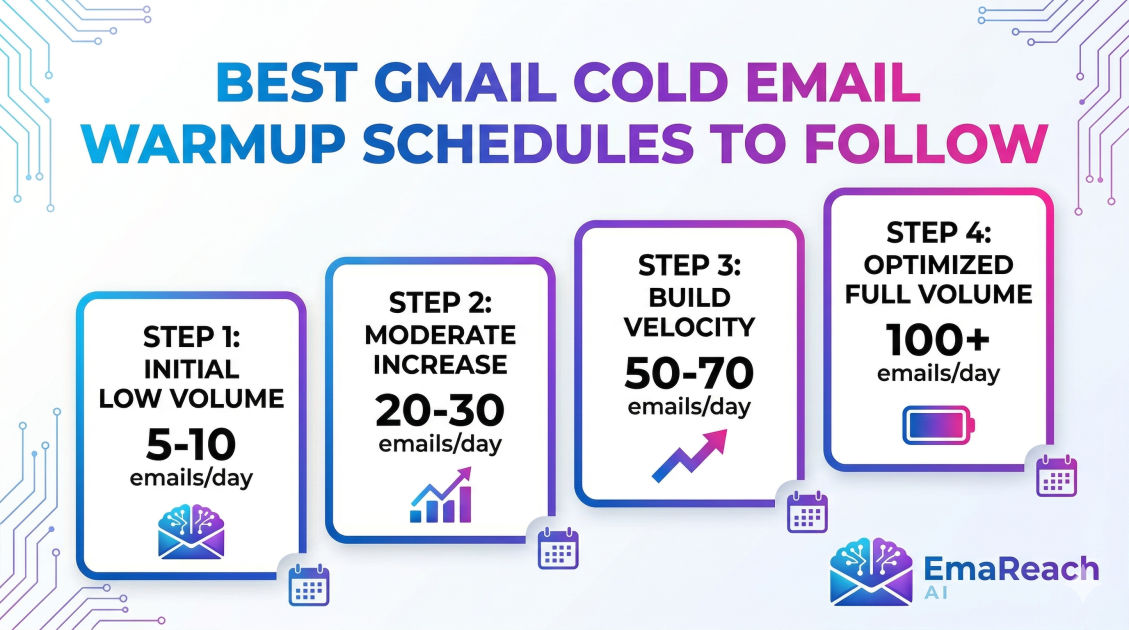
Best Gmail Cold Email Warmup Schedules to Follow
cold emailemail warmupemail deliverabilityB2B outreachsales automationGmail deliverability
Introduction
Launching a cold email campaign without properly warming up your Gmail account is a guaranteed way to end up in the spam folder. Whether you are reaching out to potential clients, networking with industry peers, or promoting a new service, the success of your outreach relies entirely on your email deliverability. If your messages never reach the primary inbox, even the most persuasive and meticulously crafted pitch is essentially invisible.
Email warmup is the process of gradually establishing a positive reputation for a new email account and domain. By slowly increasing your sending volume and simulating authentic, human-like email behavior, you signal to Internet Service Providers (ISPs)—especially strict ones like Google—that you are a legitimate sender and not a spammer. Because Gmail uses some of the most sophisticated anti-spam algorithms in the world, mastering the nuances of a Gmail-specific warmup schedule is non-negotiable for modern outreach professionals.
In this comprehensive guide, we will explore the underlying mechanics of Gmail's spam filters, detail the crucial technical steps you must take before sending a single message, and outline the best Gmail cold email warmup schedules tailored to different domain histories. By following these proven frameworks, you can build an ironclad sender reputation and ensure your outreach consistently lands in the primary inbox.
Why Gmail Requires a Specific Warmup Approach
Google commands a massive share of the email market, powering millions of personal accounts and corporate infrastructures through Google Workspace. To protect its users, Google employs highly advanced machine learning algorithms to detect and filter unsolicited mail.
When a brand-new email account suddenly sends hundreds of identical messages in a single day, Google's algorithms immediately flag this behavior as suspicious. Legitimate human users do not behave this way; they send a few emails to colleagues, receive replies, subscribe to newsletters, and gradually grow their contact list over time.
Gmail's spam filters evaluate several key factors when deciding where to place your email:
- Sender Reputation: The historical trust score assigned to your specific email address and your overall domain.
- Sending Volume and Velocity: How many emails you send per day, and how quickly you send them. Sudden spikes are heavily penalized.
- Engagement Rates: How recipients interact with your emails. High open rates, frequent replies, and emails being moved from the spam folder to the primary inbox significantly boost your reputation.
- Content and Formatting: The presence of spam-trigger words, heavy reliance on images or attachments, and poor HTML formatting.
- Technical Authentication: Whether your domain has the proper DNS records to verify your identity.
Because Google prioritizes engagement and authentic behavior, your warmup schedule must meticulously replicate the actions of a normal business user. It is not just about sending volume; it is about bidirectional communication.
Crucial Technical Prerequisites: The Foundation of Deliverability
Before you even think about starting a warmup schedule, you must establish the technical foundation of your email infrastructure. Skipping these steps renders any warmup effort completely useless, as ISPs will immediately distrust unauthenticated senders.
1. Configure SPF (Sender Policy Framework)
SPF is a DNS record that acts as a public guest list for your domain. It tells ISPs which mail servers are explicitly authorized to send emails on behalf of your domain. When you use Google Workspace, you must add a specific text record to your domain's DNS settings that lists Google as an approved sender. If an email claims to be from your domain but originates from an unlisted server, Gmail will likely block it or route it to spam.
2. Set Up DKIM (DomainKeys Identified Mail)
DKIM adds a cryptographic digital signature to every email you send. This invisible signature guarantees that the email was genuinely sent by your domain and that its contents were not tampered with during transit. You generate a DKIM key within your Google Workspace admin console and add it to your DNS records. This is a massive trust signal for Gmail.
3. Implement DMARC (Domain-based Message Authentication, Reporting, and Conformance)
DMARC ties SPF and DKIM together. It acts as a set of instructions for the receiving mail server, telling it exactly what to do if an email fails SPF or DKIM checks (e.g., quarantine it, reject it, or do nothing). Establishing a DMARC policy—even a relaxed one initially—demonstrates to Google that you actively monitor and protect your domain's integrity.
4. Optimize Your Google Workspace Profile
Spammers rarely take the time to set up complete profiles. To look like a real human to Google's algorithms:
- Upload a professional profile picture.
- Fill out all personal and organizational information in the admin console.
- Enable Two-Factor Authentication (2FA) for added security, which also signals to Google that this is a valued, protected account.
- Subscribe to a few high-quality industry newsletters so your inbox has natural incoming traffic.
Manual vs. Automated Email Warmup
Once your technical foundation is rock solid, you must choose how to execute your warmup schedule. You have two primary options: manual or automated.
The Manual Approach
Manual warmup involves organically sending emails to friends, colleagues, and alternative accounts you control. You send a few emails a day, ask the recipients to open them, reply to them, and manually move them out of the spam folder if they happen to land there.
While this method allows for highly authentic, customized interactions, it is incredibly time-consuming and difficult to scale. Maintaining a strict daily schedule, tracking response ratios, and progressively increasing volume over a month requires meticulous attention to detail. For agencies or businesses running multiple cold email accounts, manual warmup is simply not viable.
The Automated Approach
Automated warmup leverages specialized software to simulate human email activity on a massive scale. These tools connect to a network of real email addresses and programmatically send, open, reply to, and rescue emails from the spam folder on your behalf.
Using an automated platform is highly recommended because it guarantees consistency. The algorithms handle the precise daily increments and ensure a high reply rate, which is the most critical factor in building Gmail's trust.
Stop Landing in Spam. Cold Emails That Reach the Inbox. EmaReach AI combines AI-written cold outreach with inbox warm-up and multi-account sending—so your emails land in the primary tab and get replies. Utilizing robust platforms like EmaReach takes the guesswork out of the warmup phase, automatically regulating sending velocity and managing complex reply threads to rapidly establish a pristine sender reputation.
The Best Gmail Cold Email Warmup Schedules
There is no single schedule that fits every situation. A brand-new domain registered yesterday requires a much more delicate approach than an aged domain that has been actively receiving mail for years. Below are three distinct, battle-tested schedules tailored for different scenarios.
Schedule 1: The Conservative Approach (For Brand-New Domains)
If you have just purchased a new domain and set up a new Google Workspace account, your reputation is completely neutral—which, to spam filters, is suspicious. You must proceed with extreme caution to avoid triggering early penalties. This schedule spans 30 to 40 days and prioritizes a slow, steady build.
Week 1: The Incubation Phase
- Day 1: Send 1-2 emails. Receive 1-2 emails. Achieve a 100% reply rate.
- Day 2: Send 2-3 emails. Receive 2-3 emails. Achieve a 100% reply rate.
- Day 3: Send 3-5 emails. Receive 3-5 emails. Achieve an 80% reply rate.
- Day 4: Send 5-7 emails. Receive 5-7 emails. Achieve an 80% reply rate.
- Day 5: Send 7-10 emails. Achieve a 75% reply rate.
- Weekend: Maintain a low volume of 2-3 emails per day. Real humans send fewer emails on weekends, and mimicking this rhythm builds authenticity.
Week 2: Gradual Acceleration
- Day 8: Send 10-12 emails. Achieve a 60% reply rate.
- Day 9: Send 12-15 emails. Achieve a 60% reply rate.
- Day 10: Send 15-18 emails. Achieve a 55% reply rate.
- Day 11: Send 18-22 emails. Achieve a 55% reply rate.
- Day 12: Send 22-25 emails. Achieve a 50% reply rate.
- Weekend: Drop down to 5-8 emails per day.
Week 3: Establishing Consistency
- Day 15: Send 25-30 emails. Achieve a 45% reply rate.
- Day 16: Send 30-35 emails. Achieve a 45% reply rate.
- Day 17: Send 35-40 emails. Achieve a 40% reply rate.
- Day 18: Send 40-45 emails. Achieve a 40% reply rate.
- Day 19: Send 45-50 emails. Achieve a 35% reply rate.
- Weekend: Drop down to 10-15 emails per day.
Week 4: Reaching Baseline Capacity
- Day 22 to Day 26: Gradually increase the daily volume from 50 up to 70 emails, dropping the reply rate slightly to around 30%. This transition prepares the inbox for realistic cold outreach scenarios where reply rates are naturally lower.
By Day 30, your account should be safely sending 70-80 emails per day. For the absolute best deliverability, it is strongly advised to cap individual cold email accounts at 30-50 real outreach emails per day, utilizing the remaining volume for continuous background warmup.
Schedule 2: The Accelerated Approach (For Aged Domains)
If you are launching a new email account on a domain that is older than six months and has a history of organic, legitimate email traffic, you benefit from pre-existing domain trust. Gmail is more forgiving, allowing you to condense the warmup timeline from 30 days down to roughly 14 to 21 days.
Week 1: Rapid Scaling
- Day 1: Send 5 emails. Achieve an 80% reply rate.
- Day 2: Send 10 emails. Achieve an 80% reply rate.
- Day 3: Send 15 emails. Achieve a 70% reply rate.
- Day 4: Send 20 emails. Achieve a 70% reply rate.
- Day 5: Send 25 emails. Achieve a 60% reply rate.
- Weekend: Drop to 10 emails per day.
Week 2: Approaching Target Volume
- Day 8: Send 30 emails. Achieve a 50% reply rate.
- Day 9: Send 40 emails. Achieve a 50% reply rate.
- Day 10: Send 50 emails. Achieve a 45% reply rate.
- Day 11: Send 60 emails. Achieve a 40% reply rate.
- Day 12: Send 70 emails. Achieve a 35% reply rate.
Because the domain already has a solid reputation, the primary goal here is simply warming up the specific IP and the new user mailbox. However, you must still monitor bounce rates closely; even an aged domain will suffer if the new account starts bouncing hard.
Schedule 3: The Recovery Schedule (For Burned Domains)
If your domain has previously been used for aggressive, poorly managed cold outreach and your emails are currently landing in spam, your domain is 'burned.' Recovering a burned domain is difficult and requires a highly specific, extended schedule. It can take up to two months of strict adherence to restore your reputation.
Phase 1: The Hard Reset (Days 1-14) Completely pause all cold outreach. Do not send a single unsolicited email. During this phase, you must rely entirely on peer-to-peer sending or high-quality automated warmup networks. Send no more than 5-10 emails per day, ensuring a 100% open rate and an 80-100% reply rate. Every single email that lands in spam must be manually marked as 'Not Spam.'
Phase 2: The Slow Rebuild (Days 15-30) Gradually increase the volume by only 1-2 emails per day. Do not exceed 25 emails daily by the end of the month. The goal is to flood Google's algorithms with positive engagement signals, burying the historical negative data.
Phase 3: The Testing Phase (Days 31-45) Push the volume to 30-40 emails per day, keeping reply rates artificially high (around 50%). Begin sending a few internal test emails with the exact copy of your planned cold outreach to monitor folder placement. If they still land in spam, you must remain in the recovery phase longer.
Best Practices During the Warmup Phase
Adhering to the numerical daily limits is only half the battle. The content and behavior exhibited during the warmup phase are equally critical.
Use Meaningful, Conversational Text
Sending an email with a single word like "Test" or a string of random characters will harm your warmup. Spam filters analyze the semantic structure of your emails. The content used during warmup should resemble regular business conversations. Discuss scheduling a meeting, asking for a project update, or requesting a document. The language should be natural, properly punctuated, and contextually varied.
Vary Subject Lines and Message Bodies
Do not send the exact same email to thirty different addresses. Repetitive text triggers spam filters. If you are using an automated tool, ensure it utilizes AI to generate unique, varied conversation threads. If you are warming up manually, take the time to write distinct messages.
Avoid Links, Images, and Attachments
During the first two weeks of warmup, keep your emails as plain text. Do not include heavy HTML templates, large image files, attachments, or multiple hyperlinks. Even a standard signature containing several social media links can raise red flags for a new account. Introduce a simple, text-based signature around Week 3, and slowly integrate single, clean links later in the process.
Simulate Human Delays
If you need to send 20 emails in a day, do not send them all within a five-minute window. Space them out randomly over a standard 8-hour workday. Automated tools handle this pacing by default, but if you are managing the process manually, you must be disciplined about spacing out your sends.
Common Mistakes That Sabotage Email Warmup
Even with the perfect schedule, small errors can drastically derail your progress. Be vigilant in avoiding these common pitfalls:
1. Stopping the Warmup Process
One of the biggest misconceptions in cold outreach is that warmup is a temporary phase that ends once your campaign begins. Warmup should never stop. Even when you are running active campaigns, you should maintain a background warmup volume (e.g., 10-20 emails per day) to stabilize your engagement metrics. If your cold outreach generates a low reply rate on a given day, the high reply rate from your background warmup will act as a buffer, protecting your sender reputation.
2. Ignoring Bounce Rates
A high bounce rate (emails returned because the recipient address is invalid) is incredibly damaging to a new account. It signals to Google that you have poor list hygiene and are likely scraping data. Always run your target lead lists through a reputable email verification tool before sending your real campaigns. Aim to keep your bounce rate strictly below 2%.
3. Using Spam-Trigger Words in Test Emails
While warming up an account, avoid using sales-heavy terminology. Words like "Free," "Guarantee," "Urgent," "Discount," or excessive exclamation points can trip spam filters. Keep the tone completely neutral and conversational.
4. Rushing the Process
Patience is the most important attribute when warming up a Gmail account. The temptation to speed up the schedule and launch a campaign early is strong, but doing so will almost certainly result in your domain being blacklisted. Stick strictly to the daily increments, even if it feels unnecessarily slow.
Transitioning to Live Campaigns
After successfully completing your warmup schedule, you are ready to launch your actual cold outreach. However, this transition must be handled carefully.
Do not suddenly stop your warmup network and replace those 50 warmup emails with 50 cold emails in a single day. Instead, blend them. Start by sending 10 real cold emails and 40 warmup emails. Every few days, increase the proportion of real emails while maintaining a baseline of warmup activity.
Monitor your open rates closely during the first week of your live campaign. If you maintain an open rate above 50%, your warmup was successful, and your deliverability is healthy. If open rates suddenly dip below 30%, pause your cold outreach, increase your warmup volume, and investigate potential issues with your email copy or lead list.
Conclusion
Warming up a Gmail account is a foundational, unavoidable step for anyone serious about email outreach. By understanding the mechanics behind Google's sophisticated spam filters and strictly adhering to the technical prerequisites like SPF, DKIM, and DMARC, you set the stage for success.
Choosing the right schedule—whether you are cautiously nurturing a brand-new domain, rapidly scaling an aged one, or meticulously rehabilitating a burned reputation—determines your long-term deliverability. By combining patience, consistent daily volume increases, and the simulation of authentic human behavior, you build a resilient sender reputation. Ultimately, a thorough warmup process transforms your email account from a suspect entity into a trusted sender, ensuring your critical outreach messages consistently reach the primary inbox where they belong.
EmaReach AI
Ready to scale your cold email outreach?
Join thousands of teams using EmaReach AI for AI-powered campaigns, domain warmup, and 95%+ deliverability. Start free — no credit card required.
Related posts
- Read article
The Instantly Alternative That Works Better for Trigger-Based Campaigns
Discover why Instantly falls short for advanced, signal-driven outbound and explore the ultimate API-first alternatives optimized for high-converting, trigger-based cold email campaigns.
- Read article
The Instantly Alternative That Handles High Bounce Rates Without Panic
Discover how transitioning to an advanced Instantly alternative can safeguard your cold email infrastructure. Learn to handle high bounce rates effortlessly using real-time verification, smart mailbox rotation, and automated safety nets to protect your sender reputation and maintain consistent primary inbox placement.