Blog
Back to blog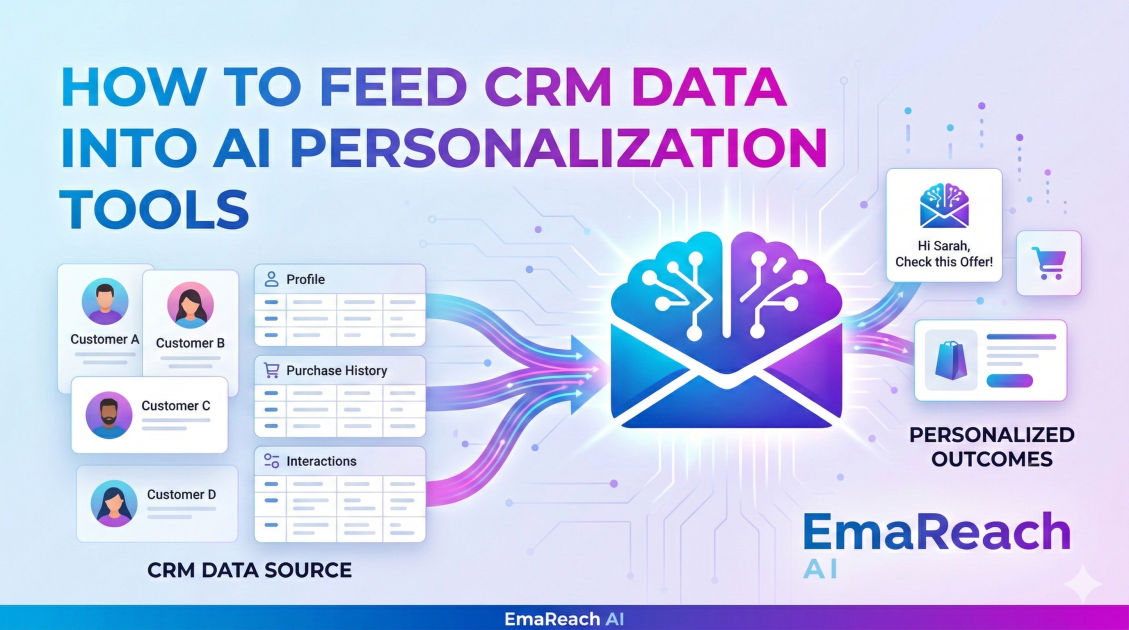
How to Feed CRM Data Into AI Personalization Tools
CRMAI PersonalizationData IntegrationMarketing AutomationCustomer DataSales TechnologyData Hygiene
Introduction
In the modern digital landscape, generic marketing is no longer just ineffective; it is often detrimental to a brand's reputation. Customers now expect interactions that are tailored to their specific needs, history, and preferences. This shift has placed Customer Relationship Management (CRM) systems at the heart of the enterprise, acting as the primary repository for customer intelligence. However, simply owning data is not enough. To truly scale personalization, businesses must learn how to effectively bridge the gap between their CRM and AI-driven personalization tools.
Personalization at scale requires the speed and cognitive capabilities of Artificial Intelligence. Whether it is generating unique email content, recommending products, or customizing website experiences, AI needs high-quality data to function. Feeding CRM data into AI tools is the process of turning static records into dynamic, actionable insights. This guide explores the technical and strategic steps required to synchronize your customer data with AI engines to create seamless, hyper-personalized experiences.
The Architecture of AI Personalization
To understand how to feed data into AI, one must first understand the architecture that supports it. Typically, this involves three layers: the Data Layer (your CRM), the Intelligence Layer (the AI tool), and the Execution Layer (your email platform, website, or ad manager).
Your CRM stores 'raw' data—names, purchase dates, support tickets, and website clicks. The AI tool acts as a processing plant, taking this raw material and refining it into 'intent' or 'affinity' scores. For example, while a CRM might show a customer bought a pair of running shoes, the AI tool can analyze the frequency and timing of that purchase to predict when they will need a replacement, feeding that insight back into your outreach strategy.
Step 1: Data Audit and Hygiene
Before connecting any AI tool, you must ensure the data in your CRM is clean and structured. AI models follow the 'garbage in, garbage out' principle. If your CRM is cluttered with duplicate records, incomplete profiles, or outdated information, the AI will generate inaccurate personalizations.
Standardizing Fields
Ensure that data fields are consistent across your entire database. For instance, if one sales representative enters 'United States' and another enters 'USA', an AI might struggle to segment these users correctly without pre-processing. Standardizing dropdown menus and implementing validation rules in your CRM is a vital first step.
Deduplication
Duplicate records fragment the customer journey. If a customer exists in your CRM twice—once with their personal email and once with their work email—the AI cannot create a unified profile. Use deduplication tools to merge these identities so the AI has a 360-degree view of the individual.
Step 2: Selecting the Right Integration Method
There are several ways to move data from a CRM to an AI tool, ranging from simple manual exports to complex real-time API integrations. The method you choose depends on your technical resources and the required 'freshness' of the data.
Native Integrations
Many modern CRM platforms offer 'plug-and-play' integrations with popular AI personalization tools. This is the easiest route, as it often requires no coding. You simply authorize the AI tool to access specific CRM folders or objects. The advantage here is ease of use; the disadvantage is often a lack of granular control over what specific data points are shared.
API-Based Synchronization
For more sophisticated setups, using an Application Programming Interface (API) is the gold standard. APIs allow for two-way communication in real-time. When a customer takes an action (like downloading a whitepaper), the CRM updates, and the AI tool is immediately notified. This allows for 'trigger-based' personalization, where the AI generates a custom response within seconds of a user action.
Middleware and iPaaS
Tools like Zapier, Make, or Tray.io act as the 'glue' between your CRM and AI. These integration Platform as a Service (iPaaS) solutions allow you to build workflows that filter data before it reaches the AI. For example, you might create a rule that says: 'Only send CRM data to the AI tool if the lead score is above 50.'
Step 3: Mapping Data Points to AI Inputs
Once the connection is established, you must decide which data points the AI actually needs. Sending too much data can be just as problematic as sending too little, as it creates 'noise' that can confuse the model.
Identifying Key Attributes
To personalize effectively, focus on these categories of data:
- Identity Data: Name, job title, company, and industry.
- Behavioral Data: Recent website visits, email opens, and content downloads.
- Transactional Data: Past purchases, subscription status, and average order value.
- Qualitative Data: Notes from sales calls or feedback from customer service tickets.
Creating Custom Objects
Sometimes, the data the AI needs doesn't fit into standard CRM fields. In these cases, you may need to create custom objects or fields. For instance, if you want an AI to personalize a cold email based on a prospect's 'Recent Milestone,' you might create a custom field in your CRM called 'Latest News' and use a scraper to fill it before the AI processes the record.
For those focused on the outreach stage of the funnel, ensuring these personalized messages actually arrive is critical. Tools like EmaReach can be an essential part of the execution layer. Stop Landing in Spam. Cold Emails That Reach the Inbox. EmaReach AI combines AI-written cold outreach with inbox warm-up and multi-account sending—so your emails land in the primary tab and get replies. By feeding your refined CRM data into a system like this, you ensure the AI's hard work isn't wasted in a junk folder.
Step 4: Structuring Data for the Prompt Engine
Most AI personalization tools operate using a 'Prompt Engine.' This engine takes a template and fills in the blanks with data from your CRM. To make this work, your CRM data must be formatted in a way that the AI can interpret naturally.
Natural Language Processing (NLP) Prep
If you are feeding 'Notes' from a CRM into an AI to generate a summary, ensure the notes are legible. If the notes are a string of shorthand and acronyms, the AI output will be nonsensical. Some companies use a 'pre-processing' AI to turn messy CRM notes into clean, descriptive paragraphs before sending them to the final personalization tool.
Variable Mapping
In your personalization tool, you will define variables like {{first_name}} or {{last_purchase}}. Mapping these accurately to your CRM fields is essential. A common mistake is mapping a 'Company Name' field that includes legal suffixes (e.g., 'Acme Corp, LLC') into an AI that writes casual emails. The result—'Hello, I saw what you are doing at Acme Corp, LLC'—immediately signals that the message was automated. Pre-cleaning these fields in the CRM ensures a more human-like AI output.
Step 5: Implementing Feedback Loops
Feeding data into the AI is only half of the battle. To improve personalization over time, you must feed data back into the CRM. This is known as a closed-loop system.
When the AI generates a personalized recommendation and the customer clicks it, that 'success' should be recorded in the CRM. The AI can then analyze which types of personalization are working for which segments. Over time, the AI learns that 'Customer A' responds better to technical specifications, while 'Customer B' responds better to social proof. This intelligence should reside in your CRM to inform future AI-driven interactions.
Ethical Considerations and Data Privacy
When feeding CRM data into AI tools, privacy must be a top priority. Depending on your jurisdiction, transferring personally identifiable information (PII) to third-party AI processors may require specific disclosures or consent.
Data Anonymization
In some cases, the AI tool does not need to know the customer's name to provide a personalization strategy. You can anonymize data by using unique IDs instead of names or email addresses. The AI processes the 'behavior' associated with ID #12345, and your internal systems map that back to the actual customer when it's time to send the message.
Compliance Check
Ensure your AI vendor is compliant with major data protection regulations. Check for SOC2 Type II certification, GDPR compliance, and encryption standards. Always review the AI tool’s Terms of Service to ensure they are not using your proprietary CRM data to train their general models, which could potentially leak your competitive intelligence to others.
Common Pitfalls to Avoid
1. The 'Over-Personalization' Trap
Just because you have data doesn't mean you should use all of it. If an AI mentions a very specific, obscure detail from a customer's CRM profile—like a specific support ticket from three years ago—it can come across as 'creepy' rather than helpful. Aim for relevance, not just recognition.
2. Ignoring Latency
If your CRM data is synced to the AI tool via a daily batch upload, your personalization will always be 24 hours behind. For high-velocity businesses, this latency can result in sending 'personalized' offers for products the customer has already bought. Real-time or near-real-time syncing is preferred for modern AI applications.
3. Lack of Human Oversight
AI is a powerful co-pilot, but it should not be left on complete autopilot without monitoring. Periodically audit the output of your AI personalization tool. Check the 'reasoning' it uses when pulling from CRM data to ensure it hasn't developed 'hallucinations' or logic errors that could alienate your audience.
The Future of CRM and AI Integration
We are moving toward a 'Zero-ETL' (Extract, Transform, Load) future where the boundaries between CRMs and AI tools disappear. In this future, the AI doesn't just 'receive' data; it lives inside the database, processing information at the point of entry. Until then, mastering the flow of data between these systems remains the most significant competitive advantage for digital marketers and sales teams.
By following a structured approach—cleaning your data, choosing the right integration architecture, and mapping fields with precision—you can transform your CRM from a static database into a powerhouse of personalized customer experiences. The goal is to make every customer feel like your only customer, and with the right data pipeline, AI makes that possible at any scale.
Conclusion
Feeding CRM data into AI personalization tools is the bridge between having information and having influence. The technical hurdles of integration and data mapping are significant, but the rewards—higher engagement, increased conversion rates, and deeper customer loyalty—are well worth the effort. Start small by syncing a few key attributes, perfect the workflow, and then scale your AI operations as your data hygiene improves. In the age of AI, your data is your greatest asset, but only if you can get it to the right tools at the right time.
EmaReach AI
Ready to scale your cold email outreach?
Join thousands of teams using EmaReach AI for AI-powered campaigns, domain warmup, and 95%+ deliverability. Start free — no credit card required.
Related posts
- Read article
The Instantly Alternative That Handles High Bounce Rates Without Panic
Discover how transitioning to an advanced Instantly alternative can safeguard your cold email infrastructure. Learn to handle high bounce rates effortlessly using real-time verification, smart mailbox rotation, and automated safety nets to protect your sender reputation and maintain consistent primary inbox placement.
- Read article
Beyond Instantly: The Cold Email Platforms Worth Taking Seriously
Discover the top advanced cold email platforms that go beyond basic multi-inbox rotation. Learn how to optimize your technical infrastructure, leverage advanced personalization, and scale your B2B sales pipeline safely without landing in the spam folder.