Blog
Back to blog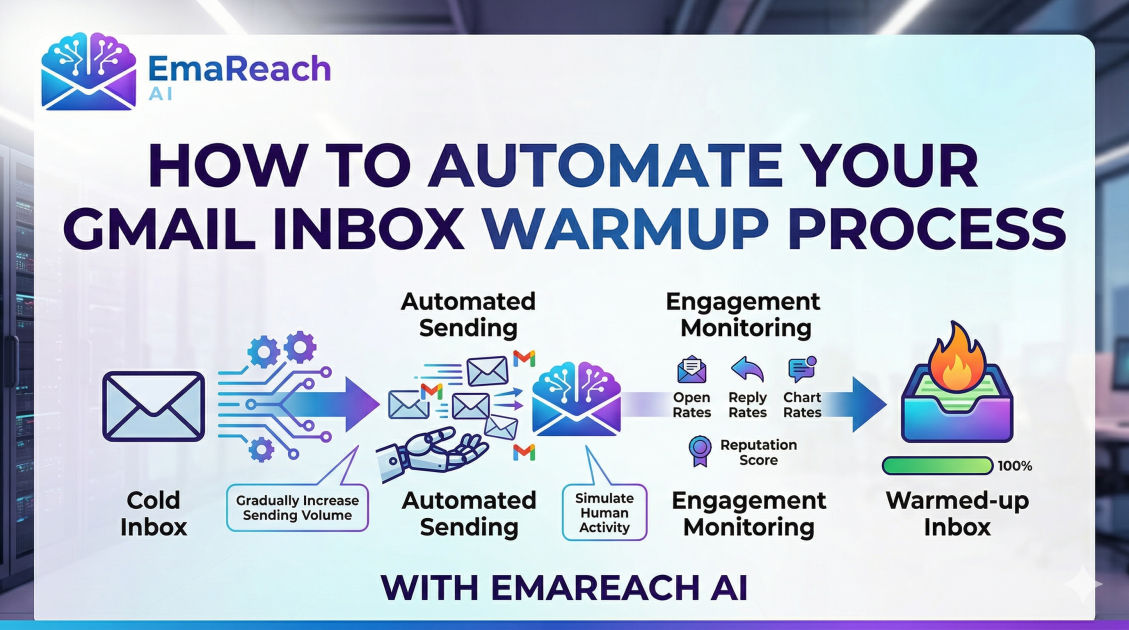
How to Automate Your Gmail Inbox Warmup Process
email deliverabilitygmail warmupcold emailautomationinbox managementsender reputation
Introduction to Gmail Inbox Warmup
In the world of digital communication, the success of your outreach campaigns hinges on one critical factor: deliverability. Whether you are a founder, a sales professional, or a marketer, your emails are worthless if they never see the light of day inside a recipient's primary inbox. When you create a new Gmail account or a Google Workspace seat, it starts with a 'neutral' reputation. If you immediately begin sending hundreds of outbound emails, Google's sophisticated spam filters will flag your behavior as suspicious, landing your messages in the dreaded spam folder or, worse, resulting in a permanent account suspension.
This is where the concept of an inbox warmup comes into play. Warming up an inbox is the process of gradually increasing the volume of emails sent from a new account to build a positive sender reputation with Internet Service Providers (ISPs). While this used to be a manual, tedious chore, automation has revolutionized the process. This guide explores how to automate your Gmail inbox warmup process to ensure your cold emails reach the primary tab and get replies.
Understanding the Mechanics of Email Deliverability
To automate a warmup effectively, you must first understand what Google is looking for. Deliverability isn't just about avoiding 'spammy' words; it is a complex calculation of technical setup, engagement metrics, and historical behavior.
The Role of Sender Reputation
Every IP address and domain has a reputation score. ISPs like Google monitor how often your emails are opened, replied to, marked as spam, or deleted without reading. A high engagement rate signals to Google that you are a legitimate human sender providing value, whereas high bounce rates or low engagement signal a bot or a spammer.
Technical Authentication: SPF, DKIM, and DMARC
Before you even think about automation, your Gmail account must be technically sound. This involves setting up three core protocols:
- SPF (Sender Policy Framework): Specifies which mail servers are authorized to send email on behalf of your domain.
- DKIM (DomainKeys Identified Mail): Adds a digital signature to your emails, proving they weren't altered in transit.
- DMARC (Domain-based Message Authentication, Reporting, and Conformance): Tells receiving servers what to do if an email fails SPF or DKIM checks.
Without these, even the best automation tools cannot save your deliverability.
Why Manual Warmup is No Longer Viable
Years ago, professionals would manually send emails to friends and colleagues, asking them to reply and mark the messages as 'not spam.' However, manual warmup is inefficient for several reasons:
- Inconsistency: Humans forget to send emails daily, leading to irregular spikes in activity that look suspicious to algorithms.
- Scalability: If you are managing ten or twenty separate domains for a large-scale outreach campaign, manual warmup becomes a full-time job.
- Limited Peer Network: You eventually run out of unique IP addresses and domains to interact with, which limits the diversity of your 'engagement' profile.
Automation solves these issues by creating a consistent, diverse, and scalable ecosystem of interactions that mimic human behavior perfectly.
How Automation Handles the Warmup Cycle
Automated warmup tools work by connecting your Gmail account to a network of other real, authenticated accounts. The process typically follows a specific lifecycle designed to satisfy Google's algorithms.
1. Gradual Volume Ramping
Automation starts by sending just a few emails per day—perhaps three to five. Over several weeks, the software incrementally increases this number. This slow 'ramp-up' is the hallmark of a natural human user who is slowly getting used to a new communication tool.
2. Intelligent Engagement Simulation
Sending emails is only half the battle. To build reputation, those emails must be opened and replied to. Automated systems ensure that the 'peer' accounts in the network open your emails, move them from the promotions tab to the primary inbox, and send back meaningful replies. This two-way conversation is the strongest signal of sender quality.
3. Spam Folder Rescue
One of the most powerful features of automation is the ability to 'rescue' emails. If an automated warmup email lands in a recipient's spam folder, the system automatically marks it as 'Not Spam' and moves it back to the inbox. This sends a direct message to Google's filters that they made a mistake and that your content is actually desired by users.
Setting Up Your Automated Gmail Warmup
To begin automating, you need a strategy that balances speed with safety. Here is the step-by-step framework for a successful automated warmup.
Phase 1: The Initial Baseline
For the first week, your automation settings should be conservative. Aim for 2 to 5 emails per day. The content of these emails should be randomized and neutral. High-quality automation tools use AI to generate varied subject lines and body copy so that the patterns don't look like template-driven bot activity.
Phase 2: The Growth Phase
During weeks two through four, you can increase the daily volume by 2 or 3 emails every day. By the end of the first month, you should be sending roughly 30 to 40 warmup emails daily. At this stage, the automation tool should also be maintaining a high 'reply rate'—usually between 30% and 45%.
Phase 3: The Maintenance Loop
Warmup is not a one-time event; it is an ongoing necessity. Even after you begin sending your actual cold outreach, you should keep the automated warmup running in the background. This 'padding' ensures that even if a few prospects mark your real emails as spam, the positive engagement from the warmup network offsets the negative signals.
Best Practices for Automated Warmup Success
While automation does the heavy lifting, you must follow certain rules to ensure the process remains effective.
Avoid 'Blast' Mentality
Even with automation, never jump from 0 to 100 emails overnight. Google monitors the velocity of your sending. A sudden spike is the fastest way to get your account flagged. Patience is the greatest virtue in email deliverability.
Use Realistic Content
Avoid using 'Lorem Ipsum' or repetitive strings of text in your warmup emails. Modern NLP (Natural Language Processing) used by Gmail can detect gibberish. Use tools that generate human-like conversations. If you want to ensure your emails reach the primary tab and get replies, it is essential to use a service like EmaReach, which combines AI-written cold outreach with inbox warm-up and multi-account sending.
Monitor Your Reputation Score
Use tools like Google Postmaster Tools alongside your automation software. Postmaster Tools provides direct data from Google about your domain reputation and spam rate. If you see your reputation dipping despite automation, it’s time to slow down your outreach and increase your warmup volume.
The Technical Side of Gmail Automation
When automating Gmail, you usually connect via OAuth or App Passwords. OAuth is the more secure method as it doesn't require you to share your actual password with the third-party service; instead, it grants specific permissions to manage mail.
Managing Multiple Accounts
If you are running a sophisticated operation, you are likely using multiple 'sender' accounts. Automation allows you to manage these from a single dashboard. This is crucial for 'inbox rotation,' a strategy where you spread your total daily volume across several different accounts (e.g., sending 25 emails from 4 different accounts rather than 100 from one). This keeps each individual account well within the 'safe' limits of Google's daily sending quotas.
Common Pitfalls in Automated Warmup
Even with the best tools, mistakes happen. Being aware of these pitfalls can save your domain from being blacklisted.
Turning Off Warmup Too Early
Many users stop the warmup the moment they start their outreach campaign. This is a mistake. The warmup serves as a safety net. If your outreach campaign has a bad day with low engagement, the steady stream of positive engagement from the warmup tool keeps your overall domain health stable.
Neglecting Your Main Domain
Always send your cold emails and perform your warmup on a 'lookalike' domain (e.g., use getcompany.com instead of company.com). If something goes wrong during the automation process and your domain gets blacklisted, you don't want your primary business email (used for internal comms and client billing) to be affected.
Over-Automation
There is such a thing as too much of a good thing. If you set your warmup to send 200 emails a day, you are exceeding the typical behavior of a human user. Aim for a total volume (warmup + actual outreach) that stays within a realistic range for a business professional—usually under 100-150 emails per day per account.
Integrating Warmup with Your Outreach Strategy
The goal of warming up your inbox isn't just to see pretty graphs in an automation dashboard; it's to enable effective outreach. Once your inbox is warm, your automated system should act as a shield.
When you launch your actual campaigns, ensure the 'tone' of your outreach matches the 'tone' of the warmup. If your warmup is purely professional and your outreach is overly aggressive or uses many links and attachments, the discrepancy might trigger filters. Keep your initial outreach emails light on links and images until you have established a rapport with the recipient's server.
Future-Proofing Your Gmail Reputation
As AI becomes more integrated into Gmail's filtering systems, the old tricks of simply 'sending more mail' won't work. The future of automated warmup lies in quality of interaction. This means:
- Meaningful Replies: AI-generated replies that actually make sense in the context of the initial email.
- Varied Scheduling: Sending emails at different times of the day to mimic a human's non-linear work schedule.
- Cross-Provider Interaction: Ensuring your Gmail account isn't just talking to other Gmail accounts, but also to Outlook, Yahoo, and private IMAP servers.
Conclusion
Automating your Gmail inbox warmup process is no longer an optional luxury for email marketers; it is a fundamental requirement for survival in a competitive digital landscape. By leveraging sophisticated automation, you remove the human error and inconsistency that leads to spam filters. You build a resilient, high-reputation domain that allows your voice to be heard by the people who matter most—your prospects.
Success in cold outreach is a marathon, not a sprint. By setting up a robust, automated warmup system and maintaining it over time, you ensure that your technical foundation is as strong as your sales copy. Stop landing in spam and start reaching the primary inbox where your business can truly grow.
EmaReach AI
Ready to scale your cold email outreach?
Join thousands of teams using EmaReach AI for AI-powered campaigns, domain warmup, and 95%+ deliverability. Start free — no credit card required.
Related posts
 Read article
The Smartlead Alternative That Finally Gets Sequence Personalization Right
Discover why modern cold outreach requires more than just volume. Explore the limitations of basic sequence personalization and learn what to look for in a true Smartlead alternative that combines hyper-relevant AI messaging with top-tier deliverability.

Why the Most Obvious Smartlead Alternative Is Not Always the Right One
Looking for a Smartlead alternative? Don't just default to the most famous or heavily advertised platform. Discover why the obvious choices often fall short in technical deliverability, pricing models, and AI innovation, and learn how to select the right system for your outbound sales needs.
