Blog
Back to blog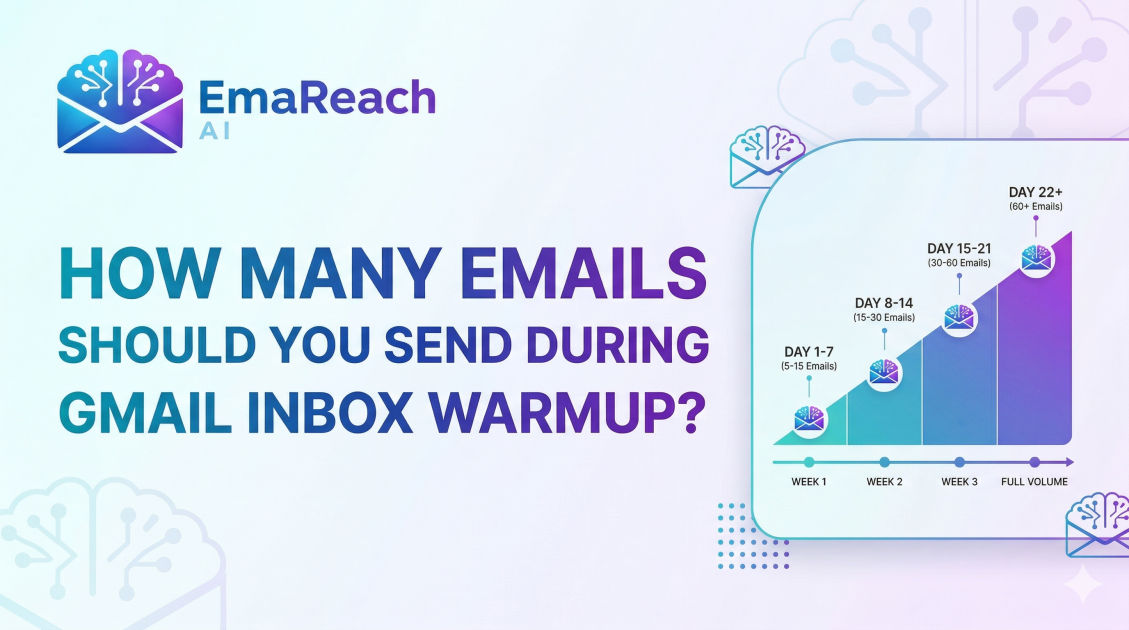
How Many Emails Should You Send During Gmail Inbox Warmup?
gmail warmupemail deliverabilitycold emailinbox warmupemail marketingsender reputation
Introduction to Gmail Inbox Warmup
When you launch a new Gmail or Google Workspace account for business outreach, your primary goal is to ensure your messages land in the recipient's primary inbox rather than the dreaded spam folder. However, most users make the mistake of sending hundreds of emails immediately after creating an account. This behavior is a massive red flag for Google’s spam filters. To build a solid sender reputation, you must engage in a process known as "inbox warmup."
Inbox warmup is the strategic process of gradually increasing the volume of emails sent from a new email address. This process mimics human behavior, showing Google that you are a legitimate sender rather than a bot or a spammer. But the most common question remains: exactly how many emails should you send during this period? Understanding the specific volume and the trajectory of these sends is the difference between a high-performing outreach campaign and a permanently blacklisted domain.
Why Sending Limits Matter for Gmail
Google maintains strict daily sending limits for both personal Gmail accounts and professional Google Workspace accounts. While a Workspace account might technically allow up to 2,000 emails per day, hitting that limit on day one will result in an immediate account suspension.
Spam filters use sophisticated algorithms to analyze the ratio of sent emails to received emails, the open rates, and the frequency of replies. If you have no history and suddenly spike your activity, you fail the "reputation check." Warming up is about creating a historical record of healthy engagement. By using a service like EmaReach, you can automate this delicate balance, ensuring your cold emails reach the inbox by combining AI-written outreach with consistent, automated warmup protocols.
The Phase-Based Approach to Email Volume
Determining how many emails to send requires a phased approach. You cannot simply pick a number and stay there; the volume must evolve.
Phase 1: The Initial Spark (Days 1–5)
In the first few days, your volume should be incredibly low. You are essentially introducing your email address to the internet.
- Day 1: 2 to 5 emails.
- Day 2: 5 to 8 emails.
- Day 3: 8 to 12 emails.
- Day 4: 12 to 15 emails.
- Day 5: 15 to 20 emails.
During this phase, it is critical that these emails are sent to "safe" addresses—accounts you own or accounts of colleagues who will definitely open the email and reply. This 100% engagement rate tells Google that your content is highly relevant to recipients.
Phase 2: Steady Growth (Days 6–14)
Once you have established a baseline, you can begin to ramp up more aggressively, but still with caution.
- Daily Increase: Add 5 to 10 emails per day.
- Target Volume by Day 14: Approximately 50 to 70 emails per day.
In this phase, you should start diversifying the domains you are sending to. Don't just send Gmail-to-Gmail; include Outlook, Yahoo, and private business domains. This demonstrates that you are a global communicator.
Phase 3: Scaling to Capacity (Days 15–30)
By the third week, your account has a two-week history of positive engagement. You can now push the limits further.
- Daily Increase: Add 10 to 15 emails per day.
- Target Volume by Day 30: 100 to 150 emails per day.
For most cold emailers, 150 emails per day per inbox is the "sweet spot." While you can send more on a Workspace account, sending 500+ emails from a single address often leads to diminishing returns in deliverability. It is better to have five accounts sending 100 emails each than one account sending 500.
Factors That Influence Your Specific Numbers
Not every account should follow the exact same numerical path. Several variables can dictate whether you should slow down or speed up your warmup.
Domain Age
If your domain is brand new (e.g., registered yesterday), you must be even more conservative. A new email on an old, established domain has more "leeway" than a new email on a new domain. For brand new domains, extend the Phase 1 period to at least 10 days before exceeding 20 emails per day.
Engagement Quality
The number of emails sent is secondary to the number of emails replied to. If you send 50 emails and get 0 replies, your reputation drops. If you send 50 emails and get 20 replies, Google views you as a high-quality sender. This is why automated warmup tools are essential—they generate these replies automatically to offset your cold outreach attempts.
Content Consistency
If you send 50 emails with the exact same subject line and body, Google’s filters will flag it as a template. To keep your numbers high without getting flagged, you must use "spintax" or AI personalization to ensure each message is unique. This allows you to scale your volume more safely.
The Role of "Inbox Interaction" Beyond Sending
Warmup isn't just about the outbound count. To safely increase your sending numbers, your account must also behave like a recipient.
- Opening Incoming Mail: Your account should regularly open emails sent to it.
- Marking as Not Spam: If any warmup emails land in your spam folder, you must manually move them to the primary inbox. This is a powerful signal to Google that they made a mistake and that you are a trusted sender.
- Archiving and Deleting: Natural users don't just leave 1,000 unread emails. They archive and organize. Simulating this behavior helps your account look human.
Common Mistakes in Volume Management
The "Weekend Drop"
Many marketers stop their warmup on Saturdays and Sundays. This creates a jagged activity pattern. While humans do work less on weekends, a total drop to zero followed by a massive spike on Monday looks suspicious. Maintain at least 30-50% of your weekday volume on weekends to keep the "heartbeat" of the account steady.
Ignoring the Bounce Rate
If you are ramping up your volume and start seeing a bounce rate higher than 2%, stop increasing your numbers immediately. High bounces are a clear signal that you are using a poor-quality lead list. Google will penalize your volume limits if you continue to hit non-existent addresses.
Skipping the Technical Setup
Before you send your first warmup email, your technical records must be perfect. No matter how slow your volume ramp-up is, you will fail without:
- SPF (Sender Policy Framework): Authenticates your mail server.
- DKIM (DomainKeys Identified Mail): Provides a digital signature.
- DMARC (Domain-based Message Authentication, Reporting, and Conformance): Tells servers what to do if SPF/DKIM fails.
How to Maintain Your Volume Post-Warmup
Once you have reached your target volume (e.g., 100 emails per day), the work isn't over. Deliverability is a moving target.
Continuous warmup is the modern standard. Even when you are sending active cold outreach, you should keep your warmup tool running in the background. This ensures that a steady stream of "perfect" engagement (opens and replies) is always padding your stats, protecting you against the occasional "mark as spam" click from a disgruntled prospect.
EmaReach provides this continuous protection, ensuring that even as you scale your multi-account sending, each individual inbox maintains its reputation through consistent, AI-managed interactions.
Transitioning from Warmup to Outreach
When do you stop "warming up" and start "selling"? You don't have to wait until day 30 to send your first sales email, but you should balance the ratio.
- Week 2: 80% Warmup emails, 20% Outreach.
- Week 3: 50% Warmup emails, 50% Outreach.
- Week 4+: 30% Warmup emails, 70% Outreach.
Never let your warmup emails drop to 0%. They serve as the "insurance policy" for your domain reputation.
Monitoring Your Progress
To know if your volume is appropriate, monitor your "Sender Score" and use tools like Google Postmaster Tools. If you see your reputation dipping from "High" to "Medium," it’s a sign to immediately cut your sending volume by 50% for one week until the reputation recovers.
Signs you are sending too many emails:
- Your open rates drop below 30%.
- You receive "Temporary Error" notifications from Google.
- Your emails start appearing in the "Promotions" tab rather than "Primary."
Conclusion
Warming up a Gmail inbox is a marathon, not a sprint. While it is tempting to start sending 200 emails a day to hit your sales targets, the long-term cost of a burned domain is far higher than the cost of a 30-day warmup period.
Start small with 2-5 emails, focus on generating replies, and increase your volume by no more than 10-15 emails per day. By the end of a month, you will have a robust, trusted sender reputation that allows your outreach to consistently land in the primary inbox. Remember, deliverability is the foundation of every successful cold email campaign; without it, even the best copy in the world will never be read. Use the right balance of volume, technical setup, and automated engagement to turn your Gmail account into a powerful engine for business growth.
EmaReach AI
Ready to scale your cold email outreach?
Join thousands of teams using EmaReach AI for AI-powered campaigns, domain warmup, and 95%+ deliverability. Start free — no credit card required.
Related posts
- Read article
The Instantly Alternative That Handles High Bounce Rates Without Panic
Discover how transitioning to an advanced Instantly alternative can safeguard your cold email infrastructure. Learn to handle high bounce rates effortlessly using real-time verification, smart mailbox rotation, and automated safety nets to protect your sender reputation and maintain consistent primary inbox placement.
- Read article
An Instantly Alternative That Does Not Break When You Scale Up
Discover why high-volume cold email outreach campaigns fail during expansion and explore an Instantly alternative engineered to maintain elite inbox deliverability at massive scale.