Blog
Back to blog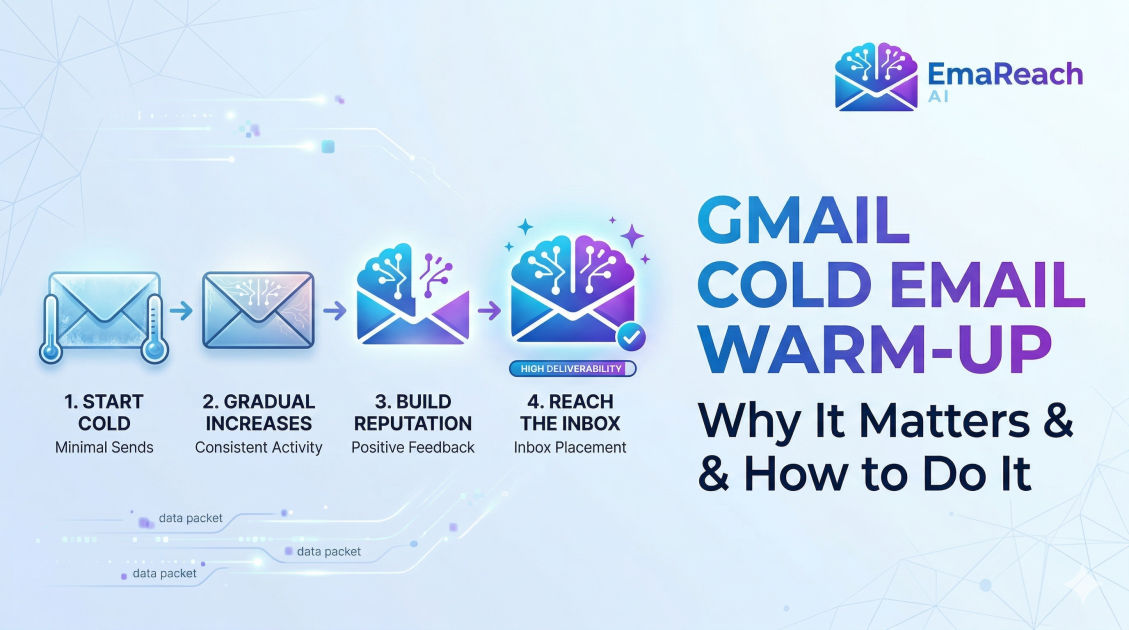
Gmail Cold Email Warm-Up: Why It Matters and How to Do It
cold emailemail warm-updeliverabilitygmail outreachdomain reputationb2b sales
Introduction
Sending a cold email campaign can often feel like shouting into the void. You spend countless hours researching your prospects, writing the perfect subject line, and crafting highly personalized copy that directly addresses their pain points. You finally hit send on your meticulously built campaign, expecting a flood of positive replies and booked meetings. However, days pass by, and the response rate remains a flat zero. The reality of modern outreach is that your perfectly crafted message likely never saw the light of day. Instead of landing in the primary inbox where it belongs, it was silently relegated to the spam folder.
At the heart of this frustration lies email deliverability, and when you are sending from or to Google's ecosystem, the rules are incredibly strict. Google utilizes highly sophisticated algorithms designed to protect its users from unsolicited junk, phishing attempts, and aggressive marketing. If you are starting a new outreach campaign—especially with a brand-new domain or a freshly created Google Workspace account—you are guilty until proven innocent in the eyes of these algorithms.
This is precisely where Gmail cold email warm-up comes into play. It is the foundational practice that separates successful outbound sales teams from those whose messages vanish into the ether. A proper warm-up process builds trust, establishes a positive sender reputation, and signals to Internet Service Providers (ISPs) that you are a legitimate human being sending valuable correspondence. In this comprehensive guide, we will explore exactly why warming up your Gmail account is a non-negotiable step, the technical prerequisites required before you begin, and a detailed, step-by-step roadmap to executing a flawless warm-up strategy.
What is Gmail Cold Email Warm-Up?
In its simplest form, cold email warm-up is the systematic process of gradually increasing the volume of emails sent from a new or dormant email address while simultaneously ensuring high levels of positive engagement on those emails. When you register a new domain and set up a new Google Workspace inbox, that account has absolutely no history. It possesses a "neutral" reputation, which ISPs treat with extreme caution.
If you take a brand-new email address and immediately blast out five hundred cold pitches on day one, Google's anti-spam algorithms will instantly flag this behavior as suspicious. Legitimate users do not behave this way; bot networks and spammers do. As a result, your domain reputation will plummet immediately, and your emails will be hard-bounced or sent straight to spam.
Warming up your account artificially simulates authentic, human email behavior over a period of several weeks. It involves sending a handful of emails on the first day, slightly more on the second, and continuing this gradual escalation. Crucially, the process also involves receiving emails, opening them, replying to them, and marking them as "not spam" if they happen to land in the junk folder. This two-way interaction builds a robust history of positive engagement, signaling to Google that your account is safe, active, and trusted by the people communicating with it.
Why Gmail Warm-Up is Absolutely Critical
Understanding the "why" behind the warm-up process is essential for appreciating the nuances of deliverability. Skipping this phase is the single most common reason why cold outreach campaigns fail before they even begin.
The Gmail Spam Filter Algorithm
Google's spam filtering is largely behavioral. It does not just look at the content of your email; it looks at how recipients interact with your historical messages. If Google sees that the first hundred emails you send are ignored, deleted without being opened, or marked as spam by the recipients, it learns that your messages are unwanted. Conversely, if it sees that your emails are frequently opened, replied to, and moved from the promotions tab to the primary inbox, it learns that your messages hold value. Warming up feeds the algorithm the exact positive behavioral data it needs to classify you as a high-quality sender.
Protecting Your Domain and IP Reputation
Your sender reputation is tied to both your IP address and your domain name. While Google Workspace manages the IP reputation for you (since you are sending from Google's shared servers), your domain reputation is entirely your responsibility. If you burn your domain reputation by skipping the warm-up phase, recovering it is a long, arduous, and sometimes impossible task. A poor domain reputation affects every email address associated with that domain. By taking the time to warm up properly, you protect the long-term viability of your domain as a business asset.
Bypassing the Sandbox Phase
Almost all newly registered domains are placed into a temporary "sandbox" or probation period by major email providers. During this time, they closely monitor your sending patterns. The warm-up process is the most effective way to prove your legitimacy and expedite your exit from this probationary phase. Until you have successfully navigated this period, any high-volume sending is practically guaranteed to trigger algorithmic penalties.
Essential Prerequisites: Setting Up Your Technical Foundation
Before you send a single warm-up email, you must prove to the world that you are who you say you are. Sending emails without proper authentication is like trying to board an international flight without a passport; you will be stopped at the gate. You must configure three critical DNS records to ensure your emails are authenticated.
Sender Policy Framework (SPF)
SPF is a DNS record that publicly lists all the IP addresses and third-party services that are authorized to send emails on behalf of your domain. When an email arrives at a prospect's inbox, their receiving server checks your SPF record. If the server sending the email is listed in your SPF record, the email passes this check. If not, the email is flagged as a potential spoofing attempt and is routed to spam.
DomainKeys Identified Mail (DKIM)
DKIM adds a cryptographic signature to every email you send. This signature is verified against a public key published in your domain's DNS records. DKIM ensures that the email was not altered or tampered with while in transit between your outbox and the recipient's inbox. It provides an additional layer of trust and is heavily weighted by Google's spam algorithms.
Domain-based Message Authentication, Reporting, and Conformance (DMARC)
DMARC ties SPF and DKIM together. It is a policy that tells receiving servers exactly what to do if an email fails either the SPF or DKIM checks. Setting up a DMARC policy (even a relaxed one that simply monitors failures) shows ISPs that you are taking active responsibility for your domain's security. Without DMARC, your deliverability will be severely handicapped right out of the gate.
Google Workspace Profile Configuration
Beyond DNS records, ensure your actual Google account looks human. Upload a professional profile picture, add a realistic signature, and configure your basic account settings. A completely blank profile with default settings sends a minor, but unnecessary, negative signal to filters.
The Mechanics of Warming Up a Gmail Account
Once your technical foundation is rock solid, the actual warm-up process can begin. This involves two main pillars: volume escalation and engagement tracking.
Gradual Volume Escalation
The golden rule of warm-up is to start incredibly slow. On day one, you might only send three to five emails. Over the course of several weeks, you incrementally increase this number. The goal is to mimic the natural growth of a business professional's email usage. Sudden spikes in volume—for example, jumping from ten emails a day to two hundred—will trigger automated spam defenses.
Meaningful Engagement Tracking
Sending volume is only half the equation; the response is what truly matters. During the warm-up phase, the emails you send must generate a high open rate and a substantial reply rate. Furthermore, if any of your warm-up emails land in the spam folder, they must be manually dragged into the primary inbox. This specific action—rescuing an email from spam—is one of the strongest positive signals you can send to Google's algorithm.
Manual vs. Automated Warm-Up Strategies
There are two primary ways to handle the warm-up process: doing it manually or utilizing specialized software.
The Manual Approach
Manual warm-up involves using your new account to subscribe to newsletters, creating accounts on various websites, and exchanging emails with colleagues, friends, and alternative accounts you control. You must log in daily, reply to incoming messages, and ensure varied conversations. While this is free, it is incredibly time-consuming, difficult to scale, and rarely generates the diverse web of interactions required to build an ironclad sender reputation.
The Automated Approach
For anyone serious about cold email outreach, automated warm-up is mandatory. Automated platforms connect your inbox to a massive network of other real inboxes. These tools automatically send, open, reply to, and rescue your emails from the spam folder, generating perfectly calibrated engagement metrics without requiring your daily intervention.
Stop Landing in Spam. Cold Emails That Reach the Inbox. EmaReach AI combines AI-written cold outreach with inbox warm-up and multi-account sending—so your emails land in the primary tab and get replies. Using a platform like EmaReach (https://www.emareach.com/) takes the manual labor out of the equation. It seamlessly builds your reputation in the background while you focus on crafting your actual campaign strategy and sourcing high-quality leads.
A Step-by-Step Gmail Warm-Up Schedule
If you are mapping out your warm-up timeline, patience is your greatest asset. A standard warm-up cycle takes anywhere from three to four weeks before you should even consider launching a commercial campaign. Here is a realistic roadmap for building your domain reputation.
Week 1: Establishing the Baseline
During the first week, your goal is simply to show that the account exists and is used by a human. Start by sending 2 to 5 emails on day one, slowly scaling to around 15 to 20 emails by the end of the week. The reply rate during this period should be exceptionally high (ideally over sixty percent). Stick to sending plain text emails without links, attachments, or heavy formatting. Keep the content conversational and natural.
Week 2: Building Consistency
In week two, you can begin to stretch your legs slightly. Increase your daily sending volume by a few emails each day, aiming to reach between 30 and 40 emails daily by the end of the week. Continue to maintain a high reply rate. This is the phase where Google starts to map your baseline behavior, so consistency in sending patterns is vital. Avoid sending all your emails in a single five-minute burst; spread them out naturally throughout the working day.
Week 3: Gaining Momentum
By week three, your domain is starting to build a recognizable, positive reputation. You can begin scaling your daily volume towards 50 to 70 emails per day. At this stage, you might introduce a single, plain text link into your email signature to accustom the spam filters to seeing links originating from your domain. Monitor your deliverability metrics closely. If you notice a sudden drop in open rates within your warm-up pool, pause your volume increases and let your reputation stabilize.
Week 4 and Beyond: Achieving Scale
In the final week of the initial warm-up phase, you can push toward your target daily volume, which for a standard Google Workspace account should generally not exceed 100 to 150 cold emails per day (to remain safely under the radar). However, finishing the fourth week does not mean the warm-up stops.
The most successful outbound teams leave their automated warm-up running indefinitely in the background, even while active campaigns are live. This continuous stream of guaranteed positive engagement acts as a buffer against the inevitable low reply rates and occasional spam complaints that come with actual cold outreach.
Best Practices to Maintain High Deliverability
Warming up your account is not a one-time fix; it is an ongoing commitment to email hygiene. Once your account is primed and ready, you must adhere to strict sending practices to protect the reputation you have just spent weeks building.
Regularly Clean Your Email List
Sending emails to invalid or non-existent addresses results in hard bounces. A high bounce rate is a massive red flag to Google, signaling that you are likely scraping data or buying low-quality lists. Always run your prospect lists through a reputable email verification tool before launching a campaign. Aim for a bounce rate of less than two percent.
Craft Highly Relevant and Personalized Copy
The days of "spray and pray" cold emailing are over. Generic, templated blasts generate high spam complaint rates. Personalize your outreach based on deep research into your prospect's company, recent news, or specific pain points. When recipients find your message relevant, they are far less likely to hit the spam button, and far more likely to reply—which further boosts your deliverability.
Avoid Spam Trigger Words and Heavy Formatting
ISPs scan your email content for vocabulary commonly associated with spam. Avoid overly aggressive sales language, excessive capitalization, multiple exclamation points, and phrases like "Free money," "Act now," or "100% guaranteed." Additionally, keep your HTML formatting simple. Emails loaded with heavy graphics, multiple tracking pixels, and complex code structures look suspiciously like promotional blasts. Plain text, or incredibly simple HTML, always performs best for cold outreach.
Monitor Your Sender Reputation Proactively
Set up Google Postmaster Tools for your domain. This free service provides direct insight into how Google views your domain reputation, spam complaint rates, and delivery errors. By keeping a close eye on these metrics, you can identify potential deliverability issues before they permanently damage your domain.
Conclusion
Mastering Gmail cold email warm-up is the foundational pillar of any successful outbound strategy. It is not merely a technical checkbox; it is the strategic process of proving your legitimacy to highly suspicious algorithms that govern the modern inbox. By taking the time to properly configure your DNS records, systematically scaling your sending volume, and maintaining a high ratio of positive engagement, you ensure that your carefully crafted messages actually reach their intended audience. While the process requires patience and discipline, the reward is a robust, highly deliverable email infrastructure capable of driving consistent, predictable revenue for your business.
EmaReach AI
Ready to scale your cold email outreach?
Join thousands of teams using EmaReach AI for AI-powered campaigns, domain warmup, and 95%+ deliverability. Start free — no credit card required.
Related posts
- Read article
The Instantly Alternative That Finally Gets Outbound Analytics Right
Discover why high-volume cold email requires a shift from surface-level vanity metrics to deep, data-driven revenue attribution, and explore the ultimate alternatives for mastering outbound engineering.
- Read article
What You Gain and What You Give Up When Switching From Instantly
Thinking about migrating your cold email stack? This detailed guide breaks down the exact operational advantages you gain and the core features you sacrifice when switching away from Instantly's popular outreach platform.