Blog
Back to blog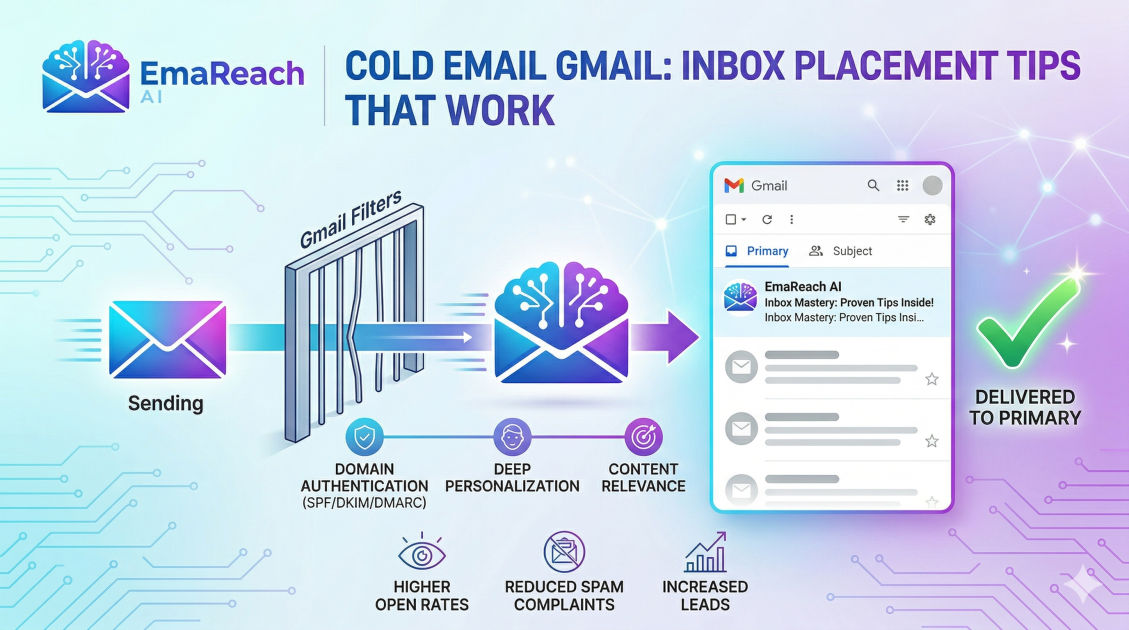
Cold Emailing on Gmail: Inbox Placement Tips That Work
cold emailinbox placementemail deliverabilityoutreach strategygmail tipsb2b sales
Introduction
Cold emailing remains one of the most effective and scalable ways to generate leads, build partnerships, and grow a business. However, the landscape of email outreach has evolved significantly. Gone are the days when you could load a list of thousands of contacts into a basic email sender and expect a high percentage of those messages to land in the primary inbox. Today, major email service providers, particularly Gmail, employ highly sophisticated algorithms designed to protect their users from spam, unsolicited promotions, and malicious content.
For businesses relying on cold outreach, Gmail's stringent spam filters represent a formidable hurdle. When your carefully crafted pitch lands in the spam folder or gets buried in the promotions tab, it might as well not exist. Inbox placement—the percentage of your emails that successfully arrive in the recipient's primary inbox—is the definitive metric that dictates the success or failure of your entire outreach campaign. If you cannot master inbox placement, your open rates will plummet, your reply rates will flatline, and your return on investment will vanish.
This comprehensive guide explores the multifaceted strategies required to achieve consistently high inbox placement when sending cold emails to and from Gmail accounts. By understanding the technical foundations, mastering the art of sender reputation, crafting algorithmic-friendly copy, and maintaining pristine list hygiene, you can ensure your outreach efforts yield tangible, profitable results.
The Foundation: Protect Your Primary Domain
Before launching any cold email campaign, you must establish an ironclad structural foundation. The most critical rule of cold emailing is one that many beginners learn the hard way: never send outbound cold emails from your company's primary domain.
Your primary domain is the lifeblood of your business's digital presence. It hosts your website, handles internal team communications, and facilitates transactional emails with your existing customers. If your cold email activities trigger spam complaints, high bounce rates, or algorithmic penalties, the reputation of the sending domain will be severely damaged. If that domain is your primary domain, your day-to-day business operations will suffer. Invoices sent to clients will bounce, internal communications might get flagged, and your overall brand authority will take a massive hit.
Instead, the industry standard practice is to purchase and configure secondary domains specifically dedicated to cold outreach. These domains should be visually similar to your primary domain to maintain brand consistency and trust. For example, if your main website is company.com, you might acquire domains like getcompany.com, trycompany.com, or companyhq.com.
By isolating your cold email activities to these secondary domains, you create a protective barrier. If one of your outreach domains burns out or suffers a reputation drop, you can simply pause campaigns on that domain, implement recovery protocols, and continue operations using other healthy secondary domains—all without ever risking the deliverability of your core business communications.
Essential Technical Configuration: SPF, DKIM, and DMARC
Once you have acquired your secondary domains and set up Google Workspace inboxes for them, you must establish technical trust. When a Gmail server receives an email, the first thing it checks is whether the sender is actually who they claim to be. This authentication process is handled by three critical DNS records: SPF, DKIM, and DMARC. Without these correctly configured, your emails are almost guaranteed to be flagged as suspicious.
SPF (Sender Policy Framework)
SPF is a DNS record that acts as a public guest list for your domain. It explicitly lists the IP addresses and mail servers that are authorized to send emails on behalf of your domain. When an email arrives, the receiving server checks the SPF record. If the email originates from a server not listed in the SPF record, the receiver will likely mark it as spam or reject it outright. Setting up SPF for Google Workspace involves adding a simple TXT record to your domain's DNS settings, explicitly authorizing Google's mail servers.
DKIM (DomainKeys Identified Mail)
DKIM adds a layer of cryptographic security to your emails. When you send an email, your server attaches a unique, encrypted digital signature to the message headers. The receiving server uses a public key (published in your DNS records) to decrypt this signature. This process verifies two crucial things: first, that the email indeed came from your domain, and second, that the contents of the email were not altered in transit. DKIM is essential for building trust with Gmail's anti-spam algorithms.
DMARC (Domain-based Message Authentication, Reporting, and Conformance)
DMARC ties SPF and DKIM together. It is a policy that tells the receiving email server what to do if an email fails SPF or DKIM authentication. You can instruct receivers to do nothing (monitor), send the email to the spam folder (quarantine), or delete it entirely (reject). Starting with a monitoring policy and gradually moving to a stricter enforcement policy protects your domain from spoofing while ensuring your legitimate emails get delivered.
Custom Tracking Domains
If you use software to track opens and clicks, the software wraps your links in a tracking URL. By default, these tracking URLs are shared among thousands of users. If another user sends spam and ruins the reputation of that shared tracking domain, your deliverability will suffer by association. Setting up a custom tracking domain ensures that your tracking links use your own domain's reputation, isolating you from the bad behavior of others.
The Crucial Phase: Domain and Inbox Warm-up
You cannot buy a new domain, configure the technical settings, and immediately start sending hundreds of cold emails a day. A brand new domain has zero reputation. In the eyes of Gmail and other providers, a sudden spike in email volume from an unknown domain is the exact behavior exhibited by spammers.
To build a positive reputation, you must undergo a process known as domain and inbox warm-up. Warm-up involves gradually increasing the volume of emails sent from your new inbox over a period of several weeks. More importantly, it requires generating positive engagement on those emails.
Positive engagement means the emails are opened, read, marked as important, replied to, and rescued from the spam folder if they happen to land there. This signals to Gmail's algorithms that your emails are valuable and desired by recipients.
To manage this complexity without spending hours each day on manual tasks, leveraging a dedicated outreach platform is highly recommended. For instance, EmaReach is a powerful solution designed precisely for this: 'Stop Landing in Spam. Cold Emails That Reach the Inbox.' EmaReach AI combines AI-written cold outreach with inbox warm-up and multi-account sending—so your emails land in the primary tab and get replies. This kind of automation ensures that your inboxes undergo a continuous, algorithmic-friendly warm-up process, establishing and maintaining the high sender reputation required for top-tier inbox placement.
Crafting Gmail-Friendly Cold Email Copy
Technical setup and domain warm-up simply get you to the front door. Your email copy dictates whether you get invited into the primary inbox or thrown into the spam folder. Spam algorithms analyze the content, structure, and formatting of your emails to determine their destination.
Ditch the Spam Trigger Words
Algorithms are trained to recognize the vocabulary of spammers and overly aggressive marketers. Using excessive sales jargon, exaggerated claims, or urgent language will trigger automated filters. Words and phrases like 'Buy direct', 'Additional income', 'Double your revenue', '100% free', 'Act now', and 'No hidden costs' should be entirely eliminated from your cold outreach vocabulary. Instead, write in a conversational, professional, and peer-to-peer tone. Your email should read like a note sent from one business professional to another, not like a billboard advertisement.
Keep Formatting Minimalist
Heavily designed HTML emails with complex layouts, multiple columns, and varied font styles are heavily associated with promotional newsletters and marketing blasts. Consequently, Gmail routes these to the Promotions tab. For cold outreach, your emails should look like standard, plain-text messages. A simple, unformatted text email feels personal and authentic, drastically increasing its chances of landing in the primary inbox.
Limit Links and Avoid Images
Links and images are heavily scrutinized by spam filters. Every link in your email is a potential liability; if the linked domain has a poor reputation, your email will be penalized. In initial cold outreach, aim to include no more than one link (often in your signature). Do not include tracking links if you can avoid it, and absolutely avoid embedding images, GIFs, or heavy attachments in your first touchpoint. Wait until the prospect has replied and established a line of communication before sharing heavy collateral.
Leverage Spintax and Deep Personalization
Sending the exact same email message to thousands of people is a massive red flag. Algorithms look for unique content. Spintax (spinning syntax) allows you to create multiple variations of your email copy by swapping out words and phrases with synonyms. More importantly, deep personalization—referencing a prospect's recent company news, a specific pain point in their industry, or a mutual connection—not only boosts your reply rates but also creates highly unique email payloads that easily bypass duplicate-content filters.
List Hygiene: The Unsung Hero of Deliverability
Your sender reputation is directly tied to how recipients interact with your emails. If you send emails to non-existent addresses, those emails will 'bounce' back to you. A high bounce rate is one of the fastest ways to destroy a domain's reputation. Gmail interprets high bounce rates as a sign that you are a spammer using an outdated or purchased list without verifying the contacts.
Always Verify Your Leads
Before loading any prospect list into your sending tool, you must run it through a bulk email verification service. These tools ping the recipient's mail server to confirm that the inbox actually exists and can receive mail. You should rigorously clean your list, removing all 'invalid' emails.
Furthermore, exercise caution with 'catch-all' emails. A catch-all domain is configured to accept all emails sent to it, even if the specific prefix (like randomname@domain.com) doesn't have a dedicated inbox. While these won't immediately bounce, they often result in low engagement because they are routed to an unmonitored administrative inbox. If your deliverability is struggling, consider removing catch-all emails from your campaigns entirely.
Purging Inactive Contacts
Deliverability is an ongoing maintenance task. If a prospect has received multiple emails from you over several weeks and has never opened or replied to a single one, continuing to email them hurts your engagement metrics. Implement a sunset policy where unresponsive contacts are automatically removed from your active sending lists. Focusing your volume strictly on engaged or fresh contacts keeps your overall metrics healthy.
Sending Patterns and Volume Limits
Even with perfect technical setup and flawless copy, sending too many emails too quickly will trigger algorithmic penalties. Gmail imposes strict limits on the number of emails a Workspace account can send per day.
Respect Account Limits
While Google Workspace theoretically allows up to 2,000 outgoing emails per day for established accounts, pushing this limit with cold outreach is incredibly dangerous. For cold emailing, a universally accepted best practice is to limit each individual inbox to a maximum of 30 to 50 cold emails per day. Keeping the volume low ensures that you stay far below the radar of rate-limiting algorithms.
Scaling Through Multi-Account Infrastructure
If you only send 50 emails a day, scaling your lead generation might seem impossible. The solution is horizontal scaling. Instead of sending 500 emails from one inbox, you set up 10 different inboxes across multiple secondary domains, sending 50 emails from each. This spreads the volume and the risk. If one inbox encounters a temporary deliverability issue, your other 9 inboxes continue generating leads uninterrupted. Managing this horizontal infrastructure seamlessly is another area where modern automation platforms prove indispensable.
Emulate Human Behavior
Spam bots send emails in massive, instantaneous batches. Humans send emails one by one, with irregular pauses between them. Your sending software must mimic human behavior. Ensure that your campaigns are configured to send emails with randomized intervals (e.g., waiting anywhere from 3 to 12 minutes between each send). Distribute your sending volume naturally across standard business hours in the recipient's timezone.
Monitoring and Maintaining Deliverability
Achieving inbox placement is not a one-time event; it is a continuous process of monitoring and adjustment. You cannot fix what you do not measure.
Google Postmaster Tools
Every cold emailer must utilize Google Postmaster Tools. By verifying your sending domains with Google, you gain access to direct data regarding how Gmail views your domain. Postmaster Tools provides dashboards showing your domain reputation (Bad, Low, Medium, or High), IP reputation, spam complaint rates, and authentication success rates. If your domain reputation drops from High to Medium, it serves as an early warning sign to pause campaigns and increase warm-up volume before your emails start hitting the spam folder.
Prioritize Reply Rates Over Open Rates
While open rates were historically the primary metric for email marketers, recent privacy updates (like Apple Mail Privacy Protection) have made open tracking unreliable. Furthermore, tracking pixels themselves can sometimes trigger strict corporate firewalls. Instead of obsessing over open rates, optimize your campaigns entirely for reply rates. A reply is the strongest possible positive signal you can send to Gmail's algorithm. If a prospect replies to your cold email, Gmail effectively whitelists you for that user, guaranteeing that your future correspondence will always land in their primary inbox.
Conclusion
Mastering cold email deliverability on Gmail requires a holistic, meticulous approach. It is an ongoing battle against highly sophisticated algorithms designed to filter out the noise. By protecting your primary domain, executing flawless technical configurations, maintaining a rigorous warm-up schedule, writing human-centric copy, and strictly managing your list hygiene, you can build a highly resilient outreach infrastructure. Consistency in these best practices ensures that your messaging consistently bypasses the spam folder, lands directly in the primary inbox, and ultimately drives the predictable revenue growth your business requires.
EmaReach AI
Ready to scale your cold email outreach?
Join thousands of teams using EmaReach AI for AI-powered campaigns, domain warmup, and 95%+ deliverability. Start free — no credit card required.
Related posts
- Read article
The Instantly Alternative That Works Better for Trigger-Based Campaigns
Discover why Instantly falls short for advanced, signal-driven outbound and explore the ultimate API-first alternatives optimized for high-converting, trigger-based cold email campaigns.
- Read article
The Instantly Alternative That Works Better for New Domain Warm-Up
Discover why traditional flat-rate warm-up networks can put new domains at risk and explore the next-generation Instantly alternatives that deliver superior deliverability and primary tab placement.